A marketing site and a web app are often built as two separate systems.
The WordPress site publishes articles, ranks for search terms, collects email subscribers, and explains the product. The app lives on a subdomain or another host, handles sign-up and billing, and may have its own analytics and deployment process.
That separation is not automatically a problem. The problem is when the visitor experiences two disconnected products:
- blog posts never link to the service or app;
- the app has no clear way back to documentation or support;
- analytics starts a new session at the handoff;
- the app’s landing page is accidentally set to
noindex; - private dashboards appear in search;
- WordPress and the app publish conflicting canonical URLs;
- sign-up works, but email, onboarding, and support do not;
- the privacy notice describes only the marketing site, not the app’s data processing.
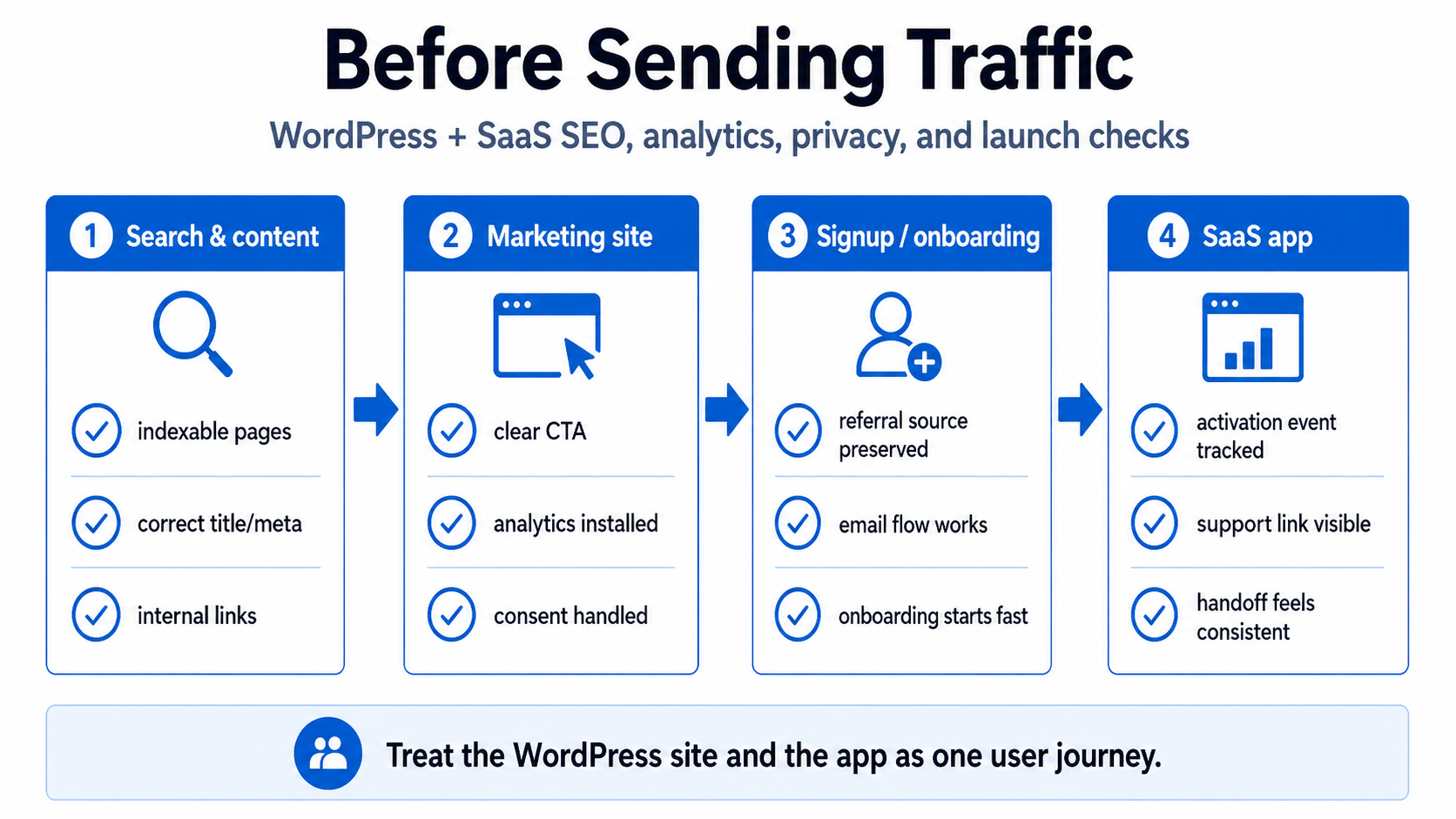
Before sending traffic from YouTube, search, email, communities, or ads, review the entire journey as one system.
Is the subdomain hurting SEO?
A subdomain by itself is not a useful diagnosis.
Moving app.example.com to example.com/app does not repair weak content, missing internal links, duplicate pages, incorrect canonicals, blocked crawling, or an app that should not be indexed in the first place.
For a small SaaS product, a sensible split is often:
- WordPress marketing site: indexable articles, landing pages, comparison pages, documentation, about, contact, privacy, and service pages.
- App subdomain: sign-up, login, onboarding, dashboards, account settings, and authenticated product screens.
- Public app landing page: indexable only when it contains distinct, useful information and has intentional metadata and internal links.
- Private app routes: protected by authentication; usually not intended as search landing pages.
The practical SEO questions are:
- Can search engines discover every public page you want indexed?
- Are those pages linked from the rest of the site?
- Do they contain useful, unique content?
- Do their canonical and indexing directives agree?
- Are private, duplicate, test, and thin pages kept out of search?
- Can a visitor understand the relationship between the brand, content, app, and service?
Do not move domains solely to calm a vague SEO concern. First inspect these signals.
Link the blog, service, and app intentionally
Google says that properly linked pages can usually be discovered by following navigation and page links. A sitemap can help discovery, but it does not guarantee indexing. See Google’s sitemap guidance.
For a WordPress content site, create clear paths such as:
- navigation link from the main site to Services;
- contextual links from relevant articles to the AI App Rescue landing page;
- links from the service page back to detailed technical articles;
- a consistent logo or navigation path from the app back to the main site;
- onboarding and error pages that link to help and support;
- a footer identifying the same company or operator across properties.
Avoid adding the same sales paragraph to every article. Link when the reader’s problem naturally matches the service.
For this blog series, the cornerstone article can link to focused articles on authentication, databases, deployment, billing, security, and operations. Each focused article can link back to the cornerstone and one adjacent topic. That creates a real knowledge structure rather than nine isolated posts.
Keep sitemaps focused on public canonical pages
WordPress usually generates a sitemap automatically or through an SEO plugin. Google notes that common CMS platforms such as WordPress often make one available.
Check that the sitemap contains:
- published articles and landing pages you want in search;
- the preferred HTTPS and hostname version;
- correct last-modified dates where supported;
- no staging URLs;
- no login, account, internal search, admin, or private app routes;
- no duplicate parameter versions;
- no obsolete pages that redirect or return errors.
A separate public app or documentation site may need its own sitemap and Search Console property. Authenticated product routes do not need to be advertised to search engines.
Submit the sitemap in Google Search Console, then use URL Inspection on important pages. “Discovered” and “submitted” do not mean “indexed.”
noindex is not access control
A noindex directive asks search engines not to show a page. It does not prevent people from opening the URL, sharing it, or accessing the data.
Use authentication and authorization for private pages.
For staging and preview environments, the safest control is access restriction: provider protection, authentication, network rules, or another actual barrier. A public preview containing private data is still exposed even if it asks search engines not to index it.
There is also a technical trap. Google must be able to crawl a page to see its noindex directive. If robots.txt blocks the crawler first, Google may not see the directive. Google documents this behavior in its robots meta tag guidance.
Use each mechanism for its real purpose:
- authentication: stop unauthorized access;
noindex: keep an accessible page out of search results;robots.txt: manage crawler access, not confidentiality;- deletion or
410: remove content that should no longer exist; - canonical: choose the preferred version among duplicate or similar public URLs.
Verify canonical URLs after every domain or plugin change
A canonical tag tells search engines which URL you prefer when multiple public URLs contain the same or very similar content.
Google describes redirects as a strong canonical signal, rel="canonical" as another strong signal, and sitemap inclusion as a weaker signal. Conflicting signals make the preferred URL harder to understand.
Inspect the rendered HTML of important pages:
- Is the canonical absolute and HTTPS?
- Does it use the preferred hostname?
- Does a production page accidentally canonicalize to staging?
- Do host-provided and custom-domain versions point to the custom domain?
- Do paginated, filtered, translated, or tracking-parameter pages have the intended behavior?
- Does the WordPress SEO plugin agree with redirects and sitemap URLs?
Do not canonicalize every app route to the homepage. Private app pages should be protected; public pages should have canonicals that match their actual content.
Treat the handoff as one analytics journey
A typical funnel crosses systems:
YouTube or Google
→ WordPress article
→ service or product landing page
→ request/sign-up form
→ email confirmation
→ app onboarding
→ first useful action
→ paid conversion
If WordPress and the app use separate analytics configurations, the handoff may look like a new user or a referral from your own domain. That makes acquisition and conversion reports unreliable.
Use the same GA4 property and appropriate tag configuration across the marketing site and app when you want one journey. For genuinely separate registrable domains, GA4 supports cross-domain measurement so one user and session can be measured across the handoff.
For subdomains of the same parent domain, the standard configuration may already preserve the session, but verify rather than assume:
- Open the marketing page in a clean browser.
- Start DebugView or inspect analytics requests.
- Click into the app or service page.
- Confirm the same user/session context continues.
- Check reports for self-referrals from your own domain or subdomain.
- Verify that consent choices, if used, carry over as intended.
Do not send email addresses, full names, private prompts, document contents, or other unnecessary personal data as analytics event parameters.
Track the funnel that explains failure
Page views alone will not tell you whether the product launch works.
Track a small event sequence:
- article or landing-page view;
- primary CTA click;
- form started;
- form submitted successfully;
- email confirmed;
- account created;
- onboarding step completed;
- first useful action completed;
- upgrade started;
- payment confirmed from trusted billing state;
- support request or critical failure.
Use stable event names and document what triggers each one. Avoid recording “purchase” from the checkout success page if the trusted webhook has not confirmed the payment.
Pair analytics with server-side operational data. A drop between “form submitted” and “email confirmed” may be an onboarding problem, an email-delivery problem, or fake/spam sign-ups. The browser event alone cannot distinguish them.
Use campaign tags consistently
Traffic from YouTube descriptions, community posts, newsletters, and ads should use consistent campaign parameters.
A basic convention might record:
- source:
youtube,newsletter,facebook,google; - medium:
video,email,social,cpc; - campaign: the launch or content series;
- content: the specific video, link position, or creative.
Document the naming scheme before several people invent different spellings. Preserve the original acquisition source when the user moves from WordPress to the app, but do not let untrusted URL parameters become raw database or HTML content without validation.
Check the public page as a conversion surface
Before sending traffic, open the page on a phone and a slow connection.
Verify:
- title and opening paragraph say exactly who the offer is for;
- primary CTA appears without hunting;
- the form asks only for information you will use;
- validation messages explain how to fix errors;
- submission cannot create duplicates through repeated clicks;
- a successful submission has a clear next step;
- confirmation email arrives and identifies the brand;
- links in the email use the production domain;
- the social-sharing image, title, and description render correctly;
- contact and privacy links are visible;
- the page remains usable with common browser privacy protections;
- performance is acceptable on mobile.
Test the form with:
- valid data;
- a mistyped email;
- duplicate email;
- slow network;
- script blocker;
- repeated clicks;
- expired confirmation link;
- a mailbox that bounces;
- obvious bot input.
Do not show success if the subscriber, request, or account was never saved.
Connect content to the app’s first useful outcome
A visitor coming from a technical article has a specific problem in mind. The landing page and onboarding should continue that context.
For example, a reader of an authorization article may respond better to:
- “Find out whether one user can access another user’s data”
than to:
- “Transform your app with a comprehensive solution.”
The first statement names a testable risk. The second says nothing.
Use content-specific CTA copy and, where useful, preserve a non-sensitive referral label so the intake form can ask relevant questions. Do not silently collect more personal information than the user expects.
Review privacy across both WordPress and the app
The marketing site may collect:
- newsletter email;
- contact-form message;
- IP and security logs;
- analytics identifiers;
- comment data;
- cookies;
- campaign parameters.
The app may additionally collect:
- account profile;
- authentication data;
- customer content;
- payment and subscription identifiers;
- support history;
- uploaded files;
- AI prompts and outputs;
- usage events.
The privacy notice should describe the real system, not only the WordPress contact form.
For operators in the Philippines, the Data Privacy Act of 2012 sets principles of transparency, legitimate purpose, and proportionality. It says personal information should be collected for specified purposes, be adequate rather than excessive, and be retained only as long as necessary. It also describes information that data subjects should receive, including the data collected, purposes, recipients, controller contact details, retention period, and their rights.
Practical launch questions include:
- Why is each field collected?
- Is any optional field presented as required?
- Which providers receive the data?
- Where is it stored?
- How long is it retained?
- How can a person request access, correction, export, or deletion where applicable?
- What happens to backups after deletion?
- Are AI or analytics providers receiving customer content?
- Are logs and session-replay tools masking sensitive fields?
- Is consent being used where another lawful basis may be more accurate, or vice versa?
This is engineering guidance, not legal advice. Obligations depend on the product, users, data, and jurisdictions. A Philippine business serving people elsewhere may also need to review other applicable privacy and consumer laws.
Harden WordPress before it becomes the traffic front door
The marketing site may not contain the product database, but compromising it can still damage the launch through malicious redirects, stolen admin sessions, injected scripts, fake forms, or altered download links.
The official WordPress hardening guide emphasizes keeping the platform updated, using trusted sources, strong credentials, appropriate file permissions, backups, and layered security.
Before launch:
- update WordPress core, active theme, and plugins;
- remove unused plugins and themes rather than only deactivating them;
- use unique administrator accounts and strong authentication;
- restrict administrator privileges;
- back up files and database, then verify restoration;
- confirm HTTPS and secure cookies;
- review forms, redirects, and injected scripts;
- moderate, disable, or protect comments if spam is not worth the operational cost;
- review user accounts and API/application passwords;
- check security and uptime alerts;
- verify the service link has not been changed by a plugin or compromised account.
A stale WordPress plugin can become the easiest path to your brand and visitors even when the SaaS app itself is well secured.
Before traffic from YouTube or email
YouTube and an existing email list can produce concentrated traffic immediately after publishing.
Check:
- the exact destination URL in the description or email;
- mobile layout and loading time;
- social preview and favicon;
- form and automation are active;
- confirmation and follow-up emails use the correct sender and links;
- unsubscribes work for marketing email;
- support can answer likely questions;
- error tracking and uptime checks are live;
- rate limits and provider quotas can handle a burst;
- a safe rollback or disable switch exists;
- the offer still works if the app itself is temporarily unavailable.
Send to a small internal or trusted segment first. Verify the complete journey, then expand.
Before paid ads
Paid traffic magnifies every funnel leak and every measurement mistake.
Before spending:
- verify conversion events from the actual production journey;
- test browser and server-side deduplication if both report conversions;
- confirm landing-page claims match the product;
- show pricing and recurring terms clearly;
- provide privacy, terms, refund, and contact information appropriate to the offer;
- exclude private or irrelevant app URLs from campaigns;
- set daily budget and abuse limits;
- monitor lead quality, not only form count;
- distinguish bot submissions from real people;
- confirm the app can onboard and support the expected volume.
Do not optimize ads toward a shallow event such as button click when the real goal is a verified request, activated user, or paid account.
The pre-traffic checklist
Discoverability
- Public pages are linked from relevant navigation or articles.
- Sitemaps contain only intended canonical pages.
- Important URLs are inspected in Search Console.
- Canonical tags, redirects, HTTPS, and hostname agree.
- Private and staging content is protected, not merely hidden.
Measurement
- Marketing site, service page, and app use a deliberate analytics design.
- Sessions do not split unexpectedly at the handoff.
- Self-referrals are investigated.
- Funnel events represent real outcomes.
- Campaign naming is consistent.
- Analytics does not collect unnecessary personal data.
Conversion and onboarding
- CTA, form, email, sign-up, and first useful action work on production domains.
- Duplicate, expired, slow, and failed cases have honest messages.
- The user always knows the next step.
- Support can locate a failed submission or onboarding attempt.
Privacy and trust
- Privacy notice matches WordPress, app, analytics, email, payment, and AI processing.
- Collection is limited to necessary fields.
- Retention and deletion behavior are defined.
- Contact, terms, cancellation, and refund information are available where relevant.
Operations
- WordPress and the app are updated and backed up.
- Error tracking, uptime checks, and alerts work.
- Quotas and rate limits can absorb the traffic source.
- A small traffic test has passed.
- A rollback or disable path is ready.
The goal is not simply to attract visitors. It is to preserve their context, earn their trust, help them reach value, and give you enough evidence to improve the next launch.
Related: why AI-built apps fail at launch and production readiness for tests, monitoring, and support.
Preparing to send traffic to an app that “mostly works”? The AI App Rescue / Production Readiness service reviews the full path from content and sign-up through permissions, deployment, billing, monitoring, and support.
Sources and further reading
- Google Search Central: Learn About Sitemaps
- Google Search Central: Robots Meta Tags and
noindex - Google Search Central: Canonical URL Methods
- Google Analytics: Set Up Cross-Domain Measurement
- National Privacy Commission: Data Privacy Act of 2012
- National Privacy Commission: Implementing Rules and Regulations
- WordPress: Hardening WordPress