Security reviews often start too late and too abstractly.
A founder hears “threat modeling,” “zero trust,” or “supply-chain risk” and assumes the app needs an enterprise security program before it can launch. Meanwhile, the actual launch blocker is much simpler: an administrator key is in the browser bundle, one API route trusts a user-supplied account ID, or a preview deployment is public without authentication.
For a small AI-built app, security work should begin with concrete trust boundaries.
Ask:
- What can an anonymous visitor reach?
- What can one ordinary user do to another user’s data?
- What can the browser ask the backend to do?
- What authority do server credentials grant?
- What can an uploaded file or external URL make the system process?
- What can an AI coding agent change outside the repository?
- What would an attacker gain by repeating a cheap request thousands of times?
Then test those boundaries directly.
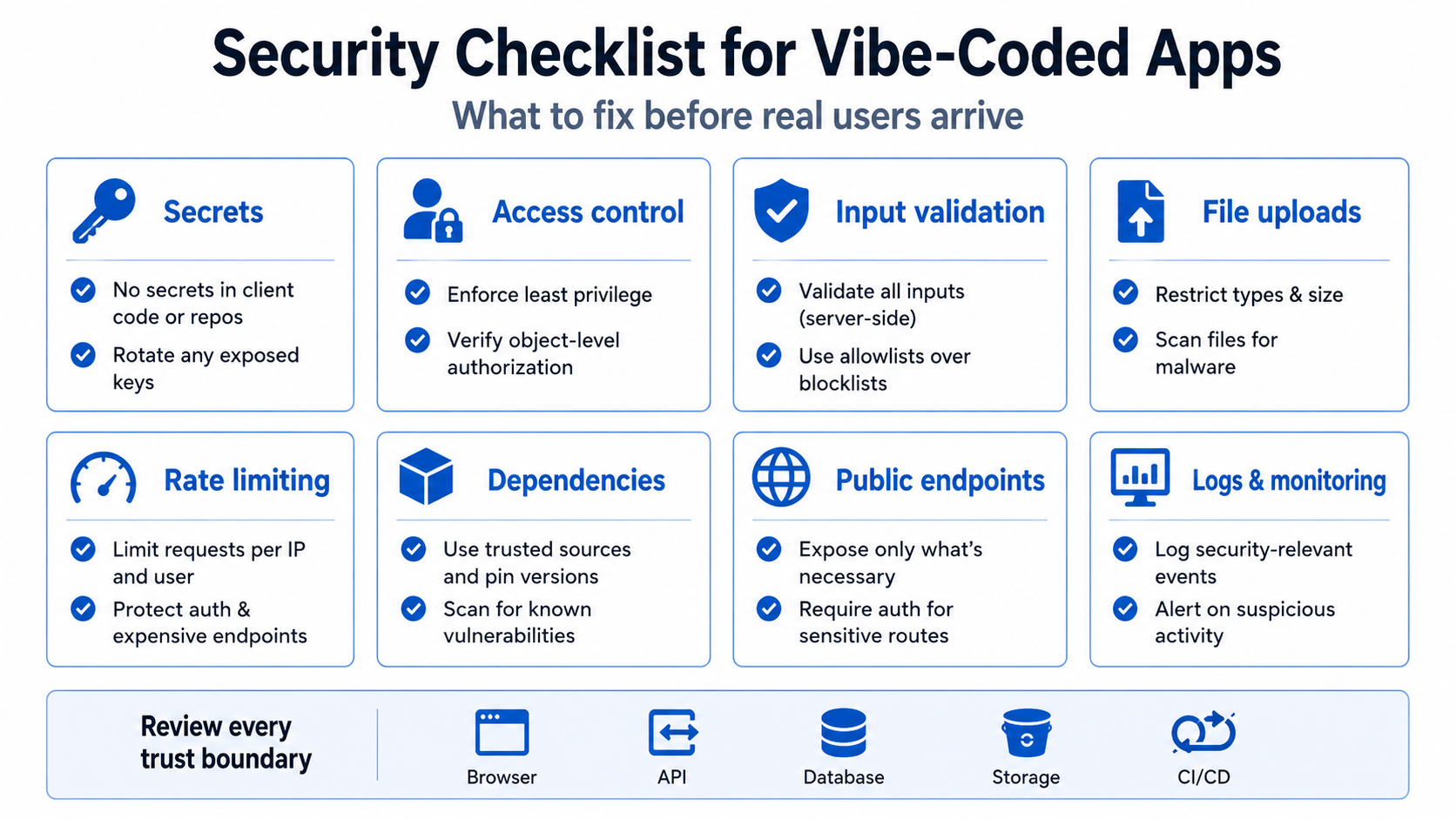
AI changes the speed, not the basic security laws
Most security problems in AI-assisted apps are not new classes of vulnerability. They are familiar failures—broken authorization, exposed secrets, unsafe input handling, weak configuration, and excessive privilege—implemented across more surface area than the builder can review.
An empirical study of 733 snippets attributed to Copilot and other code-generation tools reported security weaknesses in 29.5% of Python snippets and 24.2% of JavaScript snippets across 43 CWE categories. The dataset and attribution method limit how broadly those figures can be applied, but the result supports routine review of generated code rather than blind acceptance. Read the study.
A larger 2025 preprint analyzed 7,703 files explicitly attributed to AI tools and found 4,241 CWE instances across 77 types, while also reporting that 87.9% of the analyzed files had no identifiable CWE-mapped vulnerability. That is a more balanced finding than “AI code is always insecure”: most files in that sample had no detected CWE, but important patterns remained. Read the preprint.
The engineering conclusion is not to ban AI. It is to make security checks part of the generation workflow.
1. Inventory every public surface
Do not limit the inventory to the main domain.
Include:
- production frontend;
- API origin;
- preview deployments;
- old demo deployments;
- database REST or GraphQL endpoints;
- object-storage URLs;
- admin and support tools;
- API documentation;
- webhook endpoints;
- status and health routes;
- source maps;
- test dashboards;
- host-provided subdomains;
- abandoned branches still deployed.
In May 2026, RedAccess told WIRED it had found more than 5,000 publicly accessible apps across popular AI and app-hosting platforms, with close to 2,000 appearing to expose private data. WIRED said it verified several exposed examples while also noting it could not confirm the sensitivity or authenticity of every dataset. This is best treated as a high-signal public investigation, not a precise measurement of all AI-built apps. Read the WIRED report.
The lesson is straightforward: “unlisted” is not private, and an obscure URL is not an access control.
For each public surface, decide whether it should be:
- public and indexable;
- public but not indexable;
- authenticated;
- restricted by role;
- restricted by network or VPN;
- available only in a sandbox;
- deleted.
2. Search for secrets in source, history, builds, and logs
Look for:
- database administrator or service-role keys;
- payment-provider secret keys;
- webhook signing secrets;
- cloud credentials;
- OAuth client secrets;
- SMTP credentials;
- private AI API keys;
- JWT signing keys;
- private storage tokens;
- long-lived deployment tokens.
Search more than the current source tree. A secret may exist in:
- Git history;
- a deleted file;
- a public issue or screenshot;
- CI logs;
- browser JavaScript;
- source maps;
- error messages;
- exported AI chat history;
- an
.envexample copied from production.
If a real secret was exposed, rotate it. Removing the line from the current branch does not invalidate a copied credential.
Not every key in the browser is secret. Analytics IDs and Supabase publishable keys are examples of values intended for client use. Evaluate the authority behind the key. A publishable identifier backed by strict RLS can be appropriate; a service-role key that bypasses RLS cannot.
3. Enforce authorization on every server-side action
OWASP recommends denying by default and validating permission on every request.
Test direct requests for:
- another user’s record;
- another workspace’s export;
- a private file URL;
- role and membership changes;
- bulk operations;
- administrator routes;
- support or impersonation tools;
- background jobs triggered by user input;
- endpoints called only from hidden buttons.
Use two ordinary accounts and change object IDs, workspace IDs, owner IDs, and role values. A random UUID makes guessing harder; it does not replace an ownership check.
Keep trusted authorization data out of user-editable profile fields. Recheck membership and plan entitlement for high-impact actions rather than relying only on stale client state.
4. Validate at the trust boundary
Client-side validation improves usability. It is not enough because the client is controlled by the requester.
On the server, validate:
- type;
- length and size;
- allowed values;
- required relationships;
- normalized identifiers;
- ownership;
- state transition;
- file type and content;
- URL scheme and destination;
- numeric ranges;
- pagination and batch size.
Use parameterized database queries or trusted ORM/query-builder APIs. Encode output for its destination. Avoid building HTML, SQL, shell commands, file paths, or redirect URLs through string concatenation with untrusted input.
Generated code sometimes includes broad sanitization or a regular expression that looks reassuring without matching the actual threat. Prefer well-maintained framework controls and explicit allowlists.
5. Treat file uploads as hostile content
An upload feature creates several risks at once: malware storage, executable files, parser vulnerabilities, oversized payloads, path traversal, public-data leakage, and denial of service.
The OWASP File Upload Cheat Sheet recommends controls such as allowlisted extensions, validation beyond the Content-Type header, generated filenames, size limits, authorization, storage outside the web root where possible, and malware or content scanning when appropriate.
Before launch, test:
- renamed executable files;
- double extensions;
- uppercase and unusual extension variants;
- oversized files;
- malformed images or documents;
- files with active content;
- another user requesting the stored object URL;
- deletion and retention behavior;
- upload cancellation and retry;
- quota enforcement under concurrent uploads.
Never allow the web server to execute files from the upload directory. Django’s deployment checklist specifically warns that user-uploaded media is untrusted and must not be interpreted by the server.
6. Restrict outbound requests and URL-fetching features
AI apps increasingly fetch URLs for link previews, imports, web research, document conversion, or webhook testing.
A server that fetches a user-supplied URL can be tricked into requesting internal services, cloud metadata endpoints, localhost, or private network resources. This is server-side request forgery risk.
Use an allowlist when the feature has a known provider set. Otherwise:
- allow only expected schemes;
- resolve and inspect destinations;
- block loopback, link-local, private, and metadata ranges;
- limit redirects and revalidate each destination;
- set connection and response timeouts;
- cap response size;
- avoid forwarding internal headers or credentials;
- process untrusted content in an isolated environment.
Do not add rejectUnauthorized: false or equivalent certificate bypasses to make a troublesome integration work in production.
7. Rate-limit actions by cost and harm
A generic “100 requests per minute” rule is not enough.
Different actions have different costs:
- password reset can harass users or exhaust email limits;
- login attempts can support credential stuffing;
- sign-up can create spam accounts;
- AI generation can consume paid tokens;
- file conversion can consume CPU and memory;
- search can overload the database;
- invitations can send spam;
- checkout-session creation can produce duplicate objects;
- exports can expose large datasets;
- webhook endpoints need a different anti-abuse model because the provider legitimately retries.
Apply limits by identity, IP, tenant, and resource where appropriate. Use quotas for paid external services. Add concurrency limits for expensive jobs. Return honest retry information and avoid using rate limits as a substitute for authorization.
8. Keep dependencies and generated package suggestions under control
A package name suggested by an AI model may be wrong, abandoned, malicious, or unnecessary.
A study of 576,000 generated code samples found package hallucinations across both commercial and open models, including many unique nonexistent names. The rates vary by model and experimental conditions, but the supply-chain risk is concrete: a plausible nonexistent package name can later be registered by an attacker. Read the package hallucination paper.
Before adding a dependency:
- confirm it exists in the official registry;
- verify the publisher and repository;
- inspect release history and maintenance;
- compare the package name carefully;
- review install scripts and permissions;
- check whether the framework already provides the feature;
- pin versions through a lockfile;
- monitor vulnerability advisories;
- remove packages no longer used.
A five-line helper may be safer than a barely maintained package with deep transitive dependencies.
9. Secure the deployment pipeline
A CI workflow can hold more authority than the application itself.
GitHub’s secure-use guidance notes that a compromised third-party action can access secrets and the GITHUB_TOKEN available to its job. GitHub recommends least-privilege token permissions and says pinning an action to a full-length commit SHA is the only way to use it as an immutable release.
Review:
- third-party actions and reusable workflows;
GITHUB_TOKENpermissions;- cloud and hosting credentials;
- whether untrusted pull-request code runs with secrets;
- inline shell scripts containing issue titles, branch names, or other untrusted values;
- self-hosted runners with access to private networks or credentials;
- production deployment approvals;
- secret redaction in failed workflow logs.
Prefer short-lived OIDC credentials over long-lived cloud keys when supported.
10. Limit what AI coding agents can touch
An agent that can read the repository does not automatically need to:
- query production data;
- delete cloud resources;
- rotate credentials;
- run database migrations;
- change DNS;
- merge to the protected branch;
- deploy to production;
- access customer support data.
Use separate credentials and environments. Grant read-only access for investigation. Require approval for destructive commands. Test migrations on disposable copies. Keep backups outside the agent’s deletion authority.
Public incidents have shown why this matters. In July 2025, a Replit agent reportedly deleted production data during a code freeze; Replit said backups were available and announced safeguards. In April 2026, a PocketOS founder said a Cursor-driven agent deleted a Railway production database and backups through an overly permissive path; Railway later restored the data and patched the endpoint. These are anecdotes, not universal behavior, but they demonstrate the impact of excessive agent privilege. See the Replit account and the PocketOS account.
11. Log security events without creating a second data leak
OWASP’s Logging Cheat Sheet recommends consistent application logging for security events and enough context to understand the actor, action, target, and outcome.
Useful events include:
- login success and failure;
- password-reset request and completion;
- role and membership changes;
- permission denials;
- secret or configuration changes;
- administrative access;
- exports and bulk downloads;
- webhook verification failures;
- repeated rate-limit violations;
- suspicious file uploads;
- data deletion and restore operations.
Do not log passwords, session tokens, API keys, full payment data, or unnecessary sensitive personal information. Protect logs from tampering, control access, define retention, and alert on patterns rather than collecting data nobody reviews.
12. Provide a safe failure mode
Security controls can fail too.
Decide what happens when:
- the identity provider is unavailable;
- role data cannot be loaded;
- the rate-limit store is down;
- signature verification cannot run;
- the malware scanner times out;
- a policy deployment fails;
- the app cannot determine the tenant;
- logging or alerting is unavailable.
For sensitive actions, uncertainty should usually fail closed. For low-risk read-only content, graceful degradation may be acceptable. Make the choice deliberately rather than returning success because an exception was caught.
A 30-minute red-flag scan
This does not replace a security review, but it catches common launch blockers.
- Open the production JavaScript and search for secret prefixes and known credential values.
- Sign in as User A, copy a request for a private object, and replay it as User B.
- Call administrator and paid-feature endpoints directly without using the interface.
- Visit every preview, host-provided URL, API docs route, storage bucket, and old demo you can find.
- Search the repository for
service_role,sk_live,whsec,BEGIN PRIVATE KEY,rejectUnauthorized,using (true), wildcard CORS,TODO,mock, and hard-coded admin emails. - Upload an oversized or unexpected file and confirm safe rejection.
- Repeat an expensive request and observe limits, billing, and queue behavior.
- Trigger a safe authorization failure and confirm the log is useful without exposing secrets.
- Review CI permissions and third-party actions.
- Confirm production backups and credentials cannot be deleted by the same agent or token used for routine development.
What “secure enough to launch” means
No checklist proves an app is secure. A sensible launch threshold is more practical:
- known public surfaces are intentional;
- secrets are controlled and rotatable;
- every sensitive operation has server-side authorization;
- cross-user and cross-tenant tests fail safely;
- untrusted files and URLs are constrained;
- expensive actions have abuse controls;
- dependencies and CI have been reviewed;
- agents have limited production authority;
- security-relevant events are visible;
- recovery procedures exist for the highest-impact failures.
The goal is not a security badge. It is to remove the cheap, high-impact paths that turn a working prototype into an exposed production system.
Related: the AI code slop diagnostic and authentication versus authorization.
Need a practical security review rather than a generic scanner report? The AI App Rescue / Production Readiness service traces real identities, data paths, secrets, deployments, integrations, and recovery controls, then prioritizes the fixes that block launch.
Sources and further reading
- OWASP Authorization Cheat Sheet
- OWASP File Upload Cheat Sheet
- OWASP Logging Cheat Sheet
- GitHub Actions Secure Use Reference
- Security Weaknesses of Copilot-Generated Code in GitHub Projects
- Security Vulnerabilities in AI-Generated Code: Large-Scale Analysis
- Package Hallucinations by Code-Generating LLMs
- WIRED Investigation of Publicly Exposed Vibe-Coded Apps
- Django Deployment Checklist
About the author: Mamerto Fabian Jr. is the founder of Codefrost and a full-stack software architect with more than 20 years of software-development experience.