One of the most dangerous sentences in a web-app project is: “That page is protected.”
Protected how?
A login redirect can stop an anonymous visitor from seeing a dashboard. It does not prove that a signed-in user is allowed to read a particular record, update another account, download a file, or call an administrator endpoint.
This is where many apps that “mostly work” fail their first serious production review. Authentication is present. Authorization is incomplete.
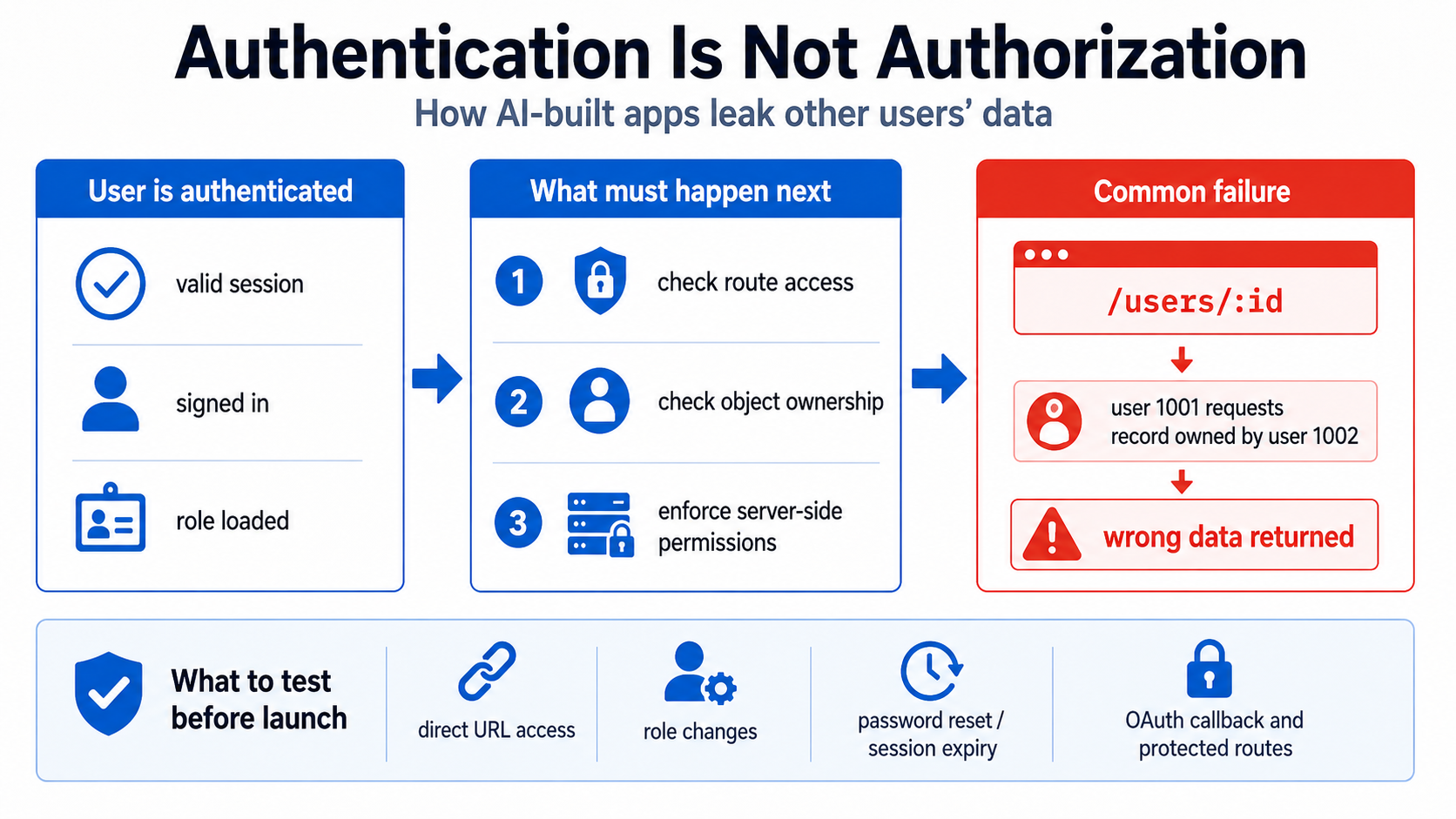
Authentication answers “Who are you?”
Authentication establishes identity. It may use a password, magic link, passkey, OAuth provider, session cookie, or access token.
When authentication succeeds, the application can say, “This request belongs to user 123.”
That is necessary, but it does not answer:
- Is user
123allowed to view project456? - Is the user still a member of the workspace that owns it?
- May the user edit it, or only read it?
- May a manager perform the action, or only an owner?
- Does a paid plan permit this feature?
- Is the request acting on the user’s own account or someone else’s?
Those are authorization questions.
OWASP’s Authorization Cheat Sheet recommends a deny-by-default model and permission validation on every request. That is a better launch standard than “the button is hidden.”
Why AI-assisted apps miss the distinction
AI coding workflows tend to build the visible path first:
- Add login.
- Redirect unauthenticated users.
- Show an admin navigation item for administrators.
- Fetch the requested object by ID.
- Celebrate because the demo works.
The missing step is often the server-side relationship check between the authenticated identity and the requested object.
A component may contain:
if (user.role !== "admin") return null;
That is useful for presentation. It is not a security control if the corresponding API route accepts the request from any signed-in user.
The Next.js authentication guide explicitly distinguishes optimistic checks used to improve the interface from secure checks made near the data source. Middleware or route redirection should not be the only defense. Server actions, route handlers, and data-access functions must verify the session and authorization for the actual operation.
The most common failure: object-level authorization
Suppose the app loads an invoice from:
/api/invoices/9f1a...
The server checks that a session exists, then runs:
select * from invoices where id = :invoice_id;
The developer may consider the route protected because only signed-in users can call it. But any signed-in user who learns or guesses another invoice ID can request it.
The secure query expresses ownership or membership too:
select *
from invoices
where id = :invoice_id
  and workspace_id in (
    select workspace_id
    from workspace_members
    where user_id = :current_user_id
  );
The exact implementation depends on the stack. The principle does not: the object query must include the authorization relationship.
This class of problem is often called insecure direct object reference, or broken object-level authorization. You can find it in reads, updates, deletes, downloads, exports, background jobs, and bulk actions.
A two-account test catches more than a one-account demo
Create two ordinary test users:
- Alice owns Project A.
- Bob owns Project B.
Then test every sensitive operation in this matrix:
| Request | Expected result |
|---|---|
| Alice reads Project A | Allowed |
| Alice updates Project A | Allowed if her role permits it |
| Alice reads Project B by changing the ID | Denied |
| Alice updates Project B | Denied |
| Bob accesses an Alice-only file URL | Denied |
| Anonymous client calls either endpoint | Denied |
| Suspended or removed user reuses an old session | Denied or safely restricted |
Do not run this only through the normal user interface. Use the browser network panel, an API client, or an automated integration test. Change route parameters, request bodies, workspace IDs, owner IDs, and file keys.
A secure interface can hide a vulnerability. A direct request reveals it.
Multi-tenant apps need a written ownership model
If the app has organizations, workspaces, teams, clients, or households, write down the relationships before reviewing code.
For every resource, answer:
- Which tenant owns it?
- Can it ever move between tenants?
- Which roles can read, create, modify, delete, export, and share it?
- What happens when a member is removed?
- What happens when the last owner leaves?
- Can support staff access it? Is that access logged?
- Can a background job or webhook act without a user session?
Then compare this model with every enforcement layer: server code, database rules, storage rules, search indexes, background workers, admin tools, and exports.
The highest-risk contradiction is when the UI checks one role model while the database checks another.
Do not trust user-editable profile metadata for roles
A common AI-generated implementation stores role: "admin" in profile metadata and then reads that value in the client or an RLS policy.
Whether that is safe depends on who can modify the metadata.
Supabase’s Row Level Security documentation warns that raw_user_meta_data can be updated by the authenticated user and is therefore not a good place for authorization data. raw_app_meta_data, which the user cannot edit directly, is more appropriate for trusted authorization claims. Even then, remember that token claims may remain stale until a token is refreshed.
In any stack, roles should come from a trusted source controlled by the server or identity provider—not a field the user can submit in a profile form.
Database authorization and application authorization should agree
With Supabase, browser access is designed to work through a publishable key plus Row Level Security. The publishable key identifies the project; the RLS policy decides which rows the current user may access.
A public incident involving Moltbook illustrates the failure mode. Researchers reported that the app’s Supabase-backed database permitted broad unauthenticated access because RLS protections were absent or ineffective. The client-visible key was not automatically the flaw. The dangerous part was what the backend allowed requests using that key to do. This account summarizes the Wiz findings.
For Firebase, the model is different but the same principle applies. Firestore rules must authorize the actual operation. The documentation also warns that Security Rules are not filters: a query is evaluated against its potential result set, and the query constraints must be compatible with the rules.
Do not assume the application’s filtered list is a security boundary. Enforce the rule where the data is served.
Route protection has several layers
A practical layered design looks like this:
Interface layer
Hide or disable actions the current user cannot perform. This prevents confusion, not attacks.
Route or middleware layer
Redirect anonymous users and reject obviously invalid requests early. Useful, but not sufficient.
Server action or API layer
Verify the session, parse and validate input, load trusted role or membership data, and authorize the operation.
Data-access layer
Query only records the actor is allowed to access. Do not fetch a record globally and hope every caller remembered a separate check.
Database or storage policy
Apply row, document, bucket, or object rules as defense in depth—especially when the browser can call the backend service directly.
Audit layer
Log high-impact administrative actions, permission changes, exports, impersonation, and security-sensitive failures without logging passwords, tokens, or unnecessary personal data.
The layers should reinforce the same ownership model, not invent their own versions of it.
Password reset is a privileged account-change flow
Password reset is often tested only by clicking the link once.
Before launch, verify:
- reset tokens expire;
- a token cannot be reused after a successful reset;
- requesting a reset does not reveal whether an email address has an account;
- the link returns to an approved domain, not an arbitrary redirect supplied by the request;
- changing the password invalidates old sessions where the threat model requires it;
- rate limits prevent reset-email abuse;
- the email clearly identifies the app and gives the user a way to report an unexpected request.
Also test a reset link opened in another browser, after signing in as a different user, and after the token expires.
OAuth success is not the end of the OAuth review
An OAuth button can work in development while production still has dangerous edge cases.
Check:
- the exact allowed callback URLs for development, preview, and production;
- state and nonce validation handled by the library or provider;
- account linking rules when the same email arrives from two providers;
- what happens when the provider does not return a verified email;
- whether a user can accidentally create duplicate accounts;
- whether logout ends the local session even if the identity provider remains signed in;
- whether preview domains are allowed more broadly than necessary.
Never solve an OAuth callback error by permitting arbitrary redirects.
Sessions change while the browser is still open
A role can be removed. A subscription can lapse. A user can be suspended. An organization membership can end. A password can be changed elsewhere.
If authorization depends only on a role copied into a long-lived token, the browser may keep privileges until the token refreshes.
For high-risk operations, load current authorization state from a trusted server-side source rather than relying entirely on old client state. Decide which changes must take effect immediately and design session invalidation or version checks accordingly.
Public visibility must be treated as a permission
In April 2026, Lovable acknowledged that a backend permissions change had accidentally re-enabled access to chats on public projects; the company said it reverted the change and had already changed public visibility defaults. Business Insider reported the incident.
This is a public incident involving a platform, not a claim about every project built with it. The useful engineering lesson is that “public,” “unlisted,” and “private” are authorization states. They need explicit tests, stable defaults, migration plans when semantics change, and clear warnings before sensitive material becomes public.
An authorization test plan for launch
Use this as a minimum practical set:
Identity states
- anonymous;
- authenticated ordinary user;
- user with an unverified email, if applicable;
- suspended or disabled user;
- expired session;
- removed workspace member;
- manager or administrator;
- system job or webhook identity.
Resource relationships
- owns the object;
- belongs to the same workspace;
- belongs to a different workspace;
- formerly belonged to the workspace;
- has a shared link;
- has a guessed or copied object ID;
- accesses an object through search, export, file storage, or a background task rather than the main route.
Operations
- list;
- read;
- create;
- update ordinary fields;
- change ownership or role fields;
- delete;
- restore;
- export;
- invite;
- bulk update;
- administrative override.
For each combination, write the expected result before running the test. This prevents the current implementation from quietly defining the policy for you.
The launch standard
A launch-ready authorization model should let you answer four questions quickly:
- Where is the identity verified?
- Where is permission checked for the specific action and object?
- What trusted data determines the user’s role or relationship?
- Which automated tests prove that one user cannot cross another user’s boundary?
When those answers are vague, the app is not ready for strangers, private data, or money—even if login works perfectly.
For a broader review, see Why AI-Built Apps “Mostly Work” but Fail at Launch and the database launch mistakes guide.
Unsure whether your app protects the actual data or only the screen? The AI App Rescue / Production Readiness service includes account-boundary and role testing with concrete findings and repair priorities.
Sources and further reading
- OWASP Authorization Cheat Sheet
- Next.js Authentication Guide
- Supabase Row Level Security
- Firebase: Securely Query Data
- Firebase Security Rules Unit Testing
- Lovable Public-Project Permissions Incident
- Moltbook Supabase Configuration Incident
About the author: Mamerto Fabian Jr. is the founder of Codefrost and a full-stack software architect with more than 20 years of software-development experience.