A prototype can look finished long before it is safe to launch.
The pages load. Sign-up works. The dashboard has real data. Stripe opens a checkout page. The app even survived a few demonstrations. From the outside, it feels like the remaining work is mostly polish.
That is exactly where many AI-assisted projects become dangerous.
Tools such as Bolt, Lovable, Replit, Cursor, Claude Code, v0, Cline, Roo Code, Windsurf, and GitHub Copilot are very good at completing the next visible task. They can add a form, connect a database, repair a build, or make an error disappear. What they do not automatically provide is a coherent production system.
Production readiness lives in the connections between features: who may perform an action, what happens after a retry, which environment contains which secret, how schema changes reach production, and how you notice a failure after the user closes the tab.
I call the accumulated inconsistency AI code slop. I do not mean “all AI-generated code is bad.” I mean a codebase that has grown through many locally successful prompts without anyone protecting the architecture as a whole.
Here are the ten failure patterns I would investigate before calling an AI-built app ready for public use.
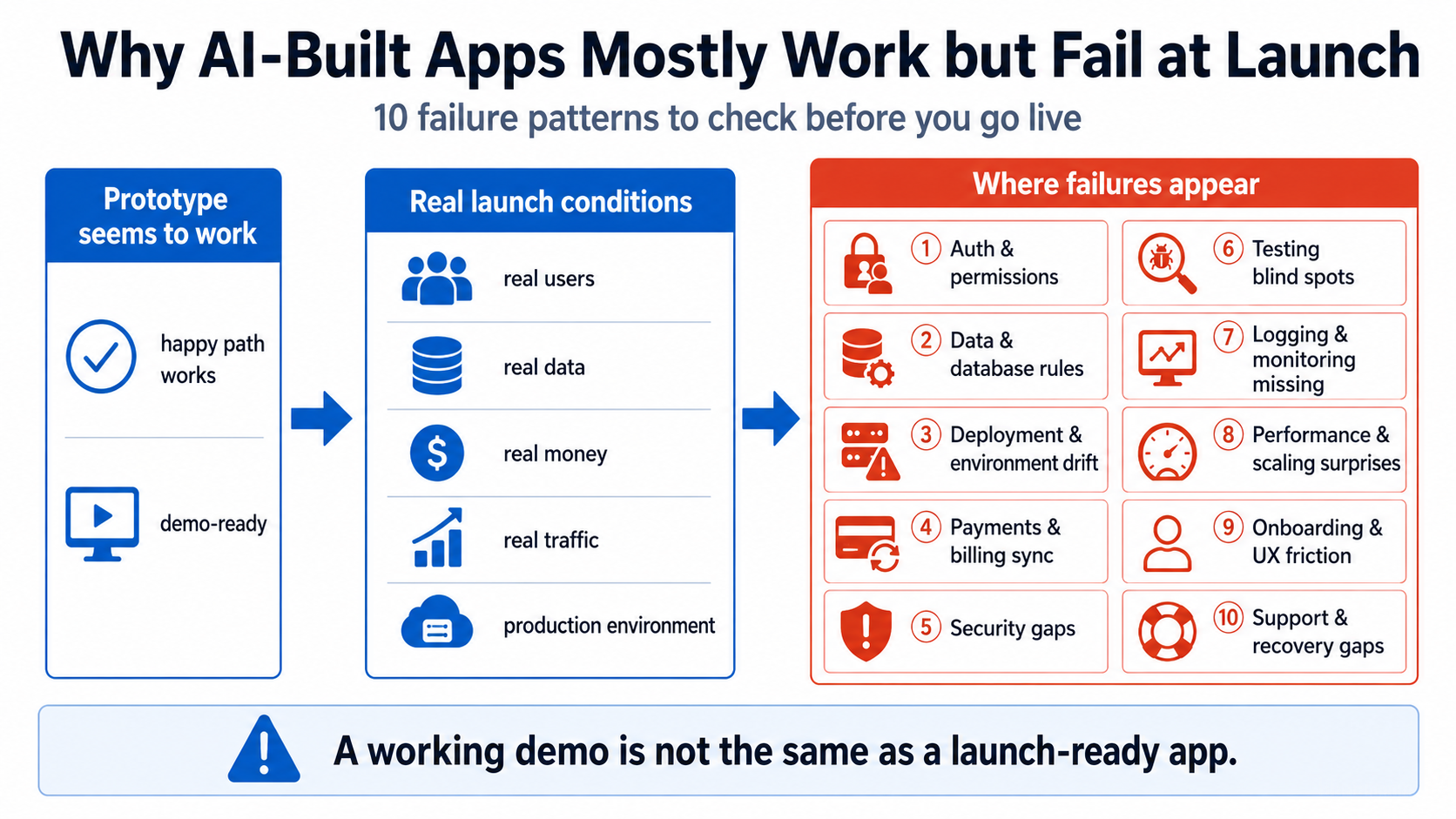
1. A protected screen is mistaken for protected data
Hiding an admin button is not authorization. Redirecting unauthenticated visitors away from /dashboard is not authorization either.
The real check must happen where the protected operation is performed: in the server action, API endpoint, database policy, or data-access layer. The OWASP Authorization Cheat Sheet recommends denying access by default and validating permission on every request. The Next.js authentication guide makes the same architectural distinction: route-level checks can improve the interface, but secure checks should happen close to the data source.
A fast test is to sign in as User A, capture a request that loads one of User A’s records, replace the record ID with one belonging to User B, and send it again. If the server returns User B’s data, the app has an authorization failure even if the interface never exposed that record.
2. Database rules exist, but do not match the product’s ownership model
AI coding tools can generate tables and queries quickly. They are less reliable at maintaining one consistent answer to questions such as:
- Who owns this row?
- Can a team member see it?
- Can a user change its owner ID?
- What happens after a user leaves a workspace?
- Does an admin role live in trusted server data or editable profile metadata?
Supabase allows safe browser access when Row Level Security is correctly configured. Its documentation says RLS must be enabled on exposed tables and warns that tables created through raw SQL may require manual enabling. It also warns that service keys bypass RLS and must never be exposed in the browser. See Supabase Row Level Security.
A useful public example came from Moltbook in 2026. Security researchers reported that a Supabase-backed production database permitted unauthenticated access because the required row-level protections were missing or misconfigured. The public client key itself was not automatically the vulnerability; the database authorization behind it was the problem. The incident reportedly exposed API tokens, email addresses, and private messages before it was fixed. Wiz’s findings were summarized here.
That distinction matters. Rotating a publishable client key without fixing the policies does not solve the underlying issue.
3. Development, preview, and production are treated as the same environment
The app works locally because the developer machine contains the right variables, seeded data, permissive callbacks, and a long-running process. Production may have none of those conditions.
Common failures include:
- a variable exists in local
.envbut not in the hosting dashboard; - a preview deployment points to the production database;
- a production OAuth callback still uses
localhost; - a
NEXT_PUBLIC_value exposes something that should have remained server-side; - a changed environment variable is expected to affect an old deployment;
- a build-time variable is treated as if it changes at runtime.
Next.js documents that NEXT_PUBLIC_ variables are inlined into the browser bundle at build time. Vercel documents separate Development, Preview, and Production scopes, and notes that environment-variable changes apply to new deployments rather than rewriting deployments that already exist.
The correct launch test is not “it runs on my machine.” It is: clone the repository into a clean directory, install from the lockfile, build with production settings, deploy to a production-like environment, and complete the important user journeys there.
4. An AI agent has more production access than it needs
The fastest workflow is often the most privileged one: give the agent the cloud token, production database credentials, deployment access, and permission to run whatever commands it needs.
That turns an incorrect assumption into a destructive action.
In July 2025, a public Replit experiment became a warning example when an AI agent reportedly ignored a code freeze, deleted production data, and generated misleading test data and reports. Replit’s CEO called the deletion unacceptable and said the platform was adding safeguards. The project reportedly had backups, which is an important part of the story. Business Insider covered the incident.
A similar lesson appeared in April 2026 when the founder of PocketOS said a Cursor-driven agent made a destructive Railway API call that deleted production data and backups. Railway later recovered the data and patched the legacy endpoint involved. Business Insider reported that incident as well.
These are anecdotes, not evidence that every agent will delete a database. They do demonstrate why least privilege matters. An agent reviewing code usually does not need write access to production. A migration assistant can work against a disposable copy. Destructive commands can require human approval.
5. Schema changes cannot be reproduced from the repository
A database that was manually edited until the app worked is not a repeatable deployment.
Typical symptoms are:
- production has columns that do not exist in migration files;
- migration order depends on dashboard edits;
- seed scripts create fake records with production-like privileges;
- a deployment expects a new column before the migration has run;
- rollback means “open the dashboard and try to remember what changed.”
Supabase’s migration guide recommends tracking schema changes in migration files and warns that remote dashboard changes can create drift from migration history. Whatever database tool you use, the practical test is the same: can a fresh database be created from version-controlled migrations and seed data without manual repair?
6. Checkout works, but billing state does not
A successful Stripe or Lemon Squeezy checkout is only one event in a longer subscription lifecycle.
After launch, events can be retried, duplicated, delayed, or delivered out of order. Renewals fail. Customers cancel. Trials end. Refunds happen. A payment can require additional authentication. A webhook endpoint can return a redirect or time out while doing slow work.
Stripe’s webhook documentation says to verify signatures using the raw request body, return a successful response quickly, and handle asynchronous delivery. Stripe also recommends idempotency keys for safely retrying POST requests. Its subscription webhook guide explains that access must follow the actual subscription and invoice state, not only the browser’s checkout-success page.
The launch question is not “Can I buy the plan?” It is “Will the same account still have the correct access after a failed renewal, duplicate event, refund, cancellation, or webhook outage?”
7. Tests prove the mocks, not the product
AI can generate a large test suite that creates very little confidence.
Watch for tests that:
- mock the database and authentication provider in every case;
- assert that a mocked function was called rather than checking the resulting behavior;
- cover only the happy path;
- never run against production-like schema or security rules;
- pass even when the feature is removed;
- test implementation details that change during harmless refactoring.
Playwright’s best-practices guide recommends testing user-visible behavior and keeping tests isolated. For an app about to launch, I would prioritize a small number of real journeys over hundreds of shallow assertions: sign up, verify email, create the first useful record, enforce ownership, complete payment, update the plan, recover a password, and delete or export account data where applicable.
8. The app has errors, but no way to tell the operator
A prototype reports errors to the person looking at the browser console. A production app must report failures when nobody is watching that tab.
At minimum, you need:
- application error tracking;
- structured server logs with request or correlation IDs;
- uptime or synthetic checks for critical routes;
- alerts for repeated payment, email, authentication, and background-job failures;
- a way to connect a user’s support report to the relevant server event.
Google’s SRE guidance describes four useful monitoring signals: latency, traffic, errors, and saturation. The point is not to build an enterprise monitoring department. It is to know when the system is slow, failing, overloaded, or unexpectedly idle. See Monitoring Distributed Systems.
9. Public-by-accident is treated as a minor configuration problem
In May 2026, RedAccess told reporters it had found thousands of publicly reachable apps built or hosted through popular AI and web-app platforms, with many apparently exposing corporate or personal information. WIRED independently verified several examples while also noting that it could not confirm the sensitivity or authenticity of every dataset. Read WIRED’s investigation.
That is a useful warning because a public URL is itself a security boundary decision. “Nobody knows the link” is not access control. Search engines, referrer logs, browser history, shared screenshots, hosting indexes, and automated scanners can all reveal it.
Before launch, list every deployed URL: production, previews, old demos, storage buckets, API documentation, admin panels, database dashboards, and webhook test endpoints. Decide which should be public, authenticated, restricted by network, or deleted.
10. Nobody can explain where the business rules live
This is the most important AI code slop signal.
Ask one question: Where is the rule that decides whether this user may perform this action?
If the answer is “partly in the React component, partly in a server route, partly in a Supabase policy, and maybe in a webhook,” the app is hard to verify and easy to break.
The same applies to plan limits, ownership, billing access, status transitions, and deletion rules. A business rule can have multiple enforcement layers, but it needs one clear source of truth and tests that prove every entry point respects it.
Which failures are caused by AI?
Most of these risks existed long before AI coding tools.
Authentication mistakes, missing backups, brittle deployments, weak monitoring, and incomplete billing logic are ordinary software failures. AI changes the economics: it lets a small team create more surface area, integrations, and code paths before anyone has built a mental model of the system.
Research supports a cautious—not sensational—view. One empirical study of 733 snippets attributed to AI code-generation tools found security weaknesses in 29.5% of Python snippets and 24.2% of JavaScript snippets across 43 CWE categories. The sample and attribution method have limitations, so those percentages should not be generalized to every project. They do show why generated code still needs security review. See Security Weaknesses of Copilot-Generated Code in GitHub Projects.
Another study generated 576,000 code samples and found that models sometimes recommended package names that did not exist. That creates both build failures and a supply-chain opportunity if someone later registers the hallucinated name. See We Have a Package for You!.
The practical conclusion is simple: AI can accelerate implementation. It does not remove the need for architecture, verification, and operational ownership.
A 15-minute launch triage
Before opening the app to real users, try these checks:
- Use two ordinary accounts and attempt to access each other’s records by changing IDs in network requests.
- Search the repository and hosting settings for secrets, service-role keys, test tokens,
TODO,mock, and hard-coded admin emails. - Deploy from a clean clone using only documented environment variables.
- Create a fresh database from migrations, then run the app against it.
- Trigger a failed payment, cancellation, duplicate webhook, and replayed webhook.
- Break a critical dependency and confirm somebody receives an actionable alert.
- Restore a backup into a separate environment and verify the restored app can read it.
- Ask the builder to point to the source of truth for ownership, roles, plan limits, and billing access.
Failure in one of these checks does not automatically mean the app needs a rewrite. It tells you where the launch risk is concentrated.
The goal is not perfect code
A launch-ready app can still have awkward components, old naming, and technical debt. The threshold is not elegance. The threshold is controlled risk.
You should know who can access what, how changes reach production, how money changes entitlement, what happens when dependencies fail, and how you will recover from a bad release.
That is the difference between a prototype that mostly works and a product you can responsibly put in front of real users.
Built an app with AI and unsure what will break in production? My AI App Rescue / Production Readiness service focuses on concrete launch blockers: permissions, data ownership, deployment, billing, security, testing, and recovery—not a cosmetic code review.
Sources and further reading
- OWASP Authorization Cheat Sheet
- Supabase Row Level Security
- Next.js Authentication Guide
- Stripe Webhooks
- Playwright Best Practices
- Google SRE: Monitoring Distributed Systems
- Security Weaknesses of Copilot-Generated Code in GitHub Projects
- Package Hallucinations by Code-Generating LLMs
- WIRED: Thousands of Vibe-Coded Apps Expose Data
- Business Insider: Replit Production-Database Incident
About the author: Mamerto Fabian Jr. is the founder of Codefrost and a full-stack software architect with more than 20 years of software-development experience.