A prototype proves that the app can work.
Production readiness asks a harder set of questions:
- Does it still work with another user, expired session, slow dependency, duplicate request, or realistic data volume?
- Will somebody know when it fails?
- Can the team explain what happened?
- Can the service recover without improvising directly in the production database?
This is where many AI-assisted projects feel uncomfortable. The codebase may contain tests, logs, and a backup setting, but nobody knows how much confidence those things actually provide.
The answer is not to copy an enterprise checklist. A solo founder needs a small set of controls that protect the product’s most important journeys.
Start with critical user journeys
Do not begin with code coverage. Begin with the promises the product makes.
For a typical SaaS app, the critical journeys may be:
- A new user signs up and verifies identity.
- The user completes the first useful action.
- The user returns and sees the data they created.
- Another user cannot see or change that data.
- A paid user purchases or renews access.
- A user recovers a lost password.
- A team member is invited, removed, or changes role.
- A user exports or deletes account data where required.
- Support can identify and resolve a failed action.
Write the expected behavior, dependencies, and failure outcome for each journey.
Example:
| Journey | Dependencies | Safe failure | Evidence |
|---|---|---|---|
| Sign up | Auth, database, email | Account remains unverified; user can retry safely | Test + auth/email logs |
| Create project | Session, authorization, database | No partial project; clear retry message | Integration test + error tracking |
| Upgrade | Billing API, webhook, database | No access until trusted payment state arrives | Webhook test + event record |
This table tells you what to test and monitor. It also exposes journeys with no owner or recovery path.
Build a confidence ladder, not a test-count contest
Different checks catch different failures. Use layers.
1. Static checks
Run formatting, linting, type checks, schema validation, and production compilation.
These catch broken imports, incompatible types, unreachable code, invalid configuration, and build-only failures. They are fast and should run on every change.
They do not prove business behavior or authorization.
2. Unit tests for deterministic rules
Use unit tests for logic that can be isolated meaningfully:
- price and entitlement mapping;
- state transitions;
- date calculations;
- validation;
- quota calculations;
- transformation of provider events into internal commands.
Avoid mocking every internal function and asserting call order. Test observable inputs and outputs.
3. Integration tests at real boundaries
Integration tests should exercise the parts most likely to disagree:
- API handler plus database;
- server action plus authorization;
- database migrations plus current application;
- RLS or Firebase rules plus authenticated contexts;
- webhook handler plus event store and entitlement logic;
- file storage plus access rules;
- email creation plus a test mailbox or captured provider.
Use disposable databases or emulators. The goal is confidence in contracts, not a fragile clone of production.
4. End-to-end tests for the promises
Playwright’s best-practices guide recommends testing user-visible behavior, keeping tests isolated, and using user-facing locators rather than implementation details.
A small launch suite might cover:
- sign up, verification, first useful action;
- login and logout;
- password reset;
- User A cannot access User B’s object;
- paid checkout in sandbox and resulting entitlement;
- cancellation or failed payment behavior;
- one administrator workflow;
- mobile-width completion of the primary flow.
Do not automate every visual detail. Automate what would materially harm users or revenue if broken.
5. Post-deploy smoke tests
Run a safe subset after each production deployment:
- home and health routes answer;
- sign-in page loads;
- a test account can authenticate;
- a read-only core action works;
- critical server errors do not spike;
- the expected version or commit is deployed.
For destructive or billing actions, use sandbox or controlled test records.
How AI-generated tests create false confidence
AI tools can produce impressive test volume quickly. Watch for these anti-patterns:
The test mocks the thing it claims to verify
An authorization test mocks canAccess() to return true, then proves the route succeeds. It verifies wiring, not authorization.
The assertions are too weak
Tests check that a response exists, a component renders, or a function was called. They do not check the record owner, status code, database side effect, or denied case.
Only happy paths exist
The suite never tests expired sessions, another tenant, duplicate events, timeouts, invalid states, or partial failure.
The test passes before the feature exists
Temporarily break or remove the intended behavior. If the test remains green, it is not constraining that behavior.
The fixture is impossible in production
Mocks return fields the real provider never sends, skip required database constraints, or use an administrator client that bypasses security rules.
The test is coupled to implementation details
A harmless refactor breaks dozens of tests while a real permission bug passes.
A good review asks what defect each test would catch. If nobody can name one, the test may be maintenance theater.
Test failure, not only success
For each critical journey, inject realistic failures:
- identity provider unavailable;
- database timeout;
- duplicate form submission;
- browser refresh during a write;
- email delivery delayed;
- webhook duplicated or out of order;
- AI API rate-limited;
- storage upload interrupted;
- worker crashes after claiming a job;
- deployment contains a missing variable;
- backup restore uses an older schema.
Verify four things:
- The user receives an honest, useful message.
- The operation does not create corrupt or duplicate state.
- The failure is logged with enough context.
- The operator is alerted when action is required.
Observability should answer user questions
Users do not report incidents in infrastructure language. They say:
- “I paid, but I am still on the free plan.”
- “My project disappeared.”
- “The invite never arrived.”
- “The spinner never stopped.”
- “I was logged into the wrong account.”
Your observability should let support connect that report to a request, job, provider event, and data change.
At minimum, use:
- application error tracking with release/version information;
- structured server logs;
- request or correlation IDs;
- provider event IDs for billing, email, and external integrations;
- uptime or synthetic checks;
- deployment records;
- alerts for repeated critical failures;
- a small operator view or query for account and job state.
OWASP’s Logging Cheat Sheet recommends recording enough context to understand when, where, who, and what happened, while excluding secrets and inappropriate sensitive data.
Monitor the four useful signals
Google’s SRE guidance describes four “golden signals”:
- Latency: how long requests and jobs take;
- Traffic: how much demand the system receives;
- Errors: failed requests or incorrect outcomes;
- Saturation: how close a limited resource is to capacity.
See Monitoring Distributed Systems.
For a small app, translate them into practical measures:
Latency
- page or API response time;
- background-job duration;
- external AI, email, and payment call duration;
- time from payment to entitlement.
Traffic
- requests;
- sign-ups;
- active users;
- generated jobs;
- webhook volume;
- email sends.
Errors
- server exceptions;
- failed logins beyond normal user mistakes;
- denied authorization attempts;
- failed jobs;
- rejected or invalid webhooks;
- email bounces;
- billing reconciliation mismatches.
Saturation
- database connections;
- function concurrency;
- queue depth;
- memory and CPU;
- storage and quota usage;
- third-party rate limits and budget.
Alert on conditions that require action. Do not page yourself for every harmless client validation error.
Logs must be useful and safe
A useful application log might include:
- timestamp;
- environment and release;
- request or job ID;
- authenticated user or tenant identifier, using a safe internal ID;
- action attempted;
- resource type and safe identifier;
- outcome and error category;
- external provider event ID;
- duration.
Do not log:
- passwords;
- session or reset tokens;
- API keys;
- full payment details;
- full request bodies by default;
- sensitive personal data that is not needed for diagnosis;
- private AI prompts or uploaded documents without a deliberate policy.
Define retention and access. A permanent log of every sensitive input can become a larger privacy risk than the original database.
Backups need a recovery objective
Two simple questions clarify backup design:
- How much recent data can the product afford to lose? This is the recovery point objective.
- How long can the product remain unavailable while recovering? This is the recovery time objective.
A small beta may accept several hours of data loss and a manual restore. A paid operational system may not.
Back up all required state, not only the main database:
- relational or document data;
- uploaded files;
- authentication configuration and mappings;
- encryption keys and secrets needed to read restored data;
- migrations and application version;
- provider identifiers and webhook event history;
- infrastructure and DNS configuration where practical.
Restore to a separate environment. Run migrations if required, then complete a critical journey and permission test. Document the commands and decisions while they are fresh.
Keep recovery credentials and backups outside the authority of the routine deployment token or coding agent.
Write three short runbooks
A solo founder does not need a hundred-page operations manual. Start with three one-page runbooks.
1. Bad deployment
- how to identify the deployed commit;
- how to stop traffic or disable the feature;
- how to promote the last known-good build;
- how database compatibility affects rollback;
- how to verify recovery;
- how to communicate with affected users.
2. Data or permission incident
- how to restrict access quickly;
- how to preserve logs and evidence;
- how to rotate credentials;
- how to determine affected users and data;
- who makes privacy or legal notification decisions;
- how to verify the repair.
3. External-provider outage
- which features degrade;
- whether requests queue or fail;
- how retries work;
- when to disable the feature;
- what the user sees;
- how to reconcile after recovery.
Runbooks reduce destructive improvisation during stress.
Support is part of production readiness
Before inviting users, provide:
- a visible support contact;
- expected response boundaries, even if informal;
- a way to report account and billing problems without sending secrets;
- an internal method to find the user’s relevant events;
- canned steps for common failures;
- a way to announce known incidents or maintenance;
- a process for deleting, correcting, or exporting data where applicable.
Do not ask users to send passwords, full card information, session cookies, or private API keys in screenshots.
If the product can charge money, store valuable data, or block a user’s work, support cannot be an afterthought.
Minimum viable production-readiness score
Use this as a prioritization tool, not a certification.
| Category | Weight | Full-credit evidence |
|---|---|---|
| Security and authorization | 25 | Deny-by-default controls; cross-user tests; secrets reviewed; abuse controls |
| Data integrity and recovery | 20 | Reproducible migrations; constraints; backup restored; ownership tested |
| Deployment and configuration | 15 | Clean build; separated environments; domain/SSL verified; rollback plan |
| Testing and QA | 15 | Critical journeys; integration boundaries; denied and failure cases; post-deploy smoke test |
| Billing and external integrations | 10 | Verified, idempotent webhooks; lifecycle tests; reconciliation |
| Observability and operations | 10 | Errors, logs, uptime, alerts, runbooks, support lookup |
| UX, privacy, and launch communication | 5 | Clear onboarding, legal/privacy basics, support and error messages |
| Total | 100 |
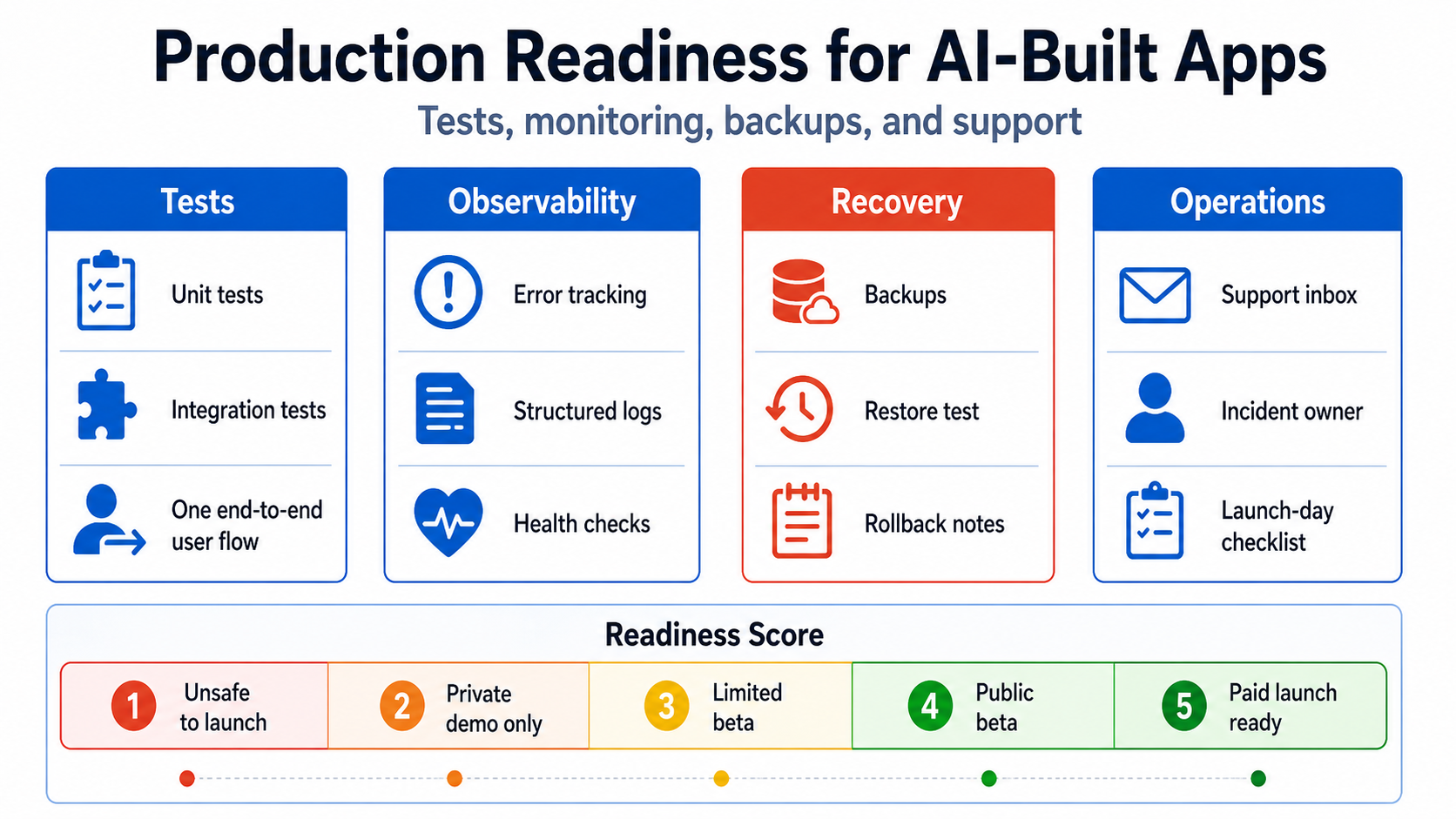
Score interpretation
- 0–39: Unsafe to launch. High-impact boundaries are unknown or untested.
- 40–59: Private demo only. Suitable for controlled demonstrations with synthetic data.
- 60–74: Limited beta. Invite a small group, avoid sensitive data or irreversible commitments, and monitor closely.
- 75–89: Public beta. Core risks are controlled, but keep limits, rapid rollback, and active support.
- 90–100: Paid launch ready. Strong evidence exists across all critical categories. This still does not mean risk-free.
Critical caps
Do not allow a high total score to hide a dangerous gap. Cap the readiness level if any of these are true:
- cross-user or cross-tenant access is possible;
- a production secret is exposed in the client or repository;
- there is no usable backup or restore path;
- the app can charge money without verified, idempotent billing state;
- production cannot be deployed reproducibly;
- no one is alerted to critical failures;
- personal or sensitive data is collected without a clear purpose and protection plan.
Launch-day operating sequence
Before sending traffic:
- Freeze unrelated changes.
- Record the intended commit, configuration, migration, and feature flags.
- Verify backup and recovery access.
- Deploy through the normal production pipeline.
- Run post-deploy smoke and authorization checks.
- Verify error tracking, logs, synthetic checks, and alerts.
- Send a small amount of traffic first.
- Watch sign-up, error, latency, queue, email, and billing signals.
- Keep the rollback owner and decision threshold clear.
- Record incidents and unexpected support questions for the next release.
A launch is an operational event, not simply a publish button.
The practical standard
Production-ready does not mean perfect architecture, complete test coverage, or zero technical debt.
It means the team can answer:
- What must work?
- What evidence says it works?
- How will we know when it does not?
- How do we stop the damage?
- How do we recover?
- How do we help the affected user?
When an AI-built app can answer those questions, it has moved beyond a prototype—even if some code is still untidy.
Related: why AI-built apps fail at launch and the deployment reality check.
Need an evidence-based launch decision rather than another generic checklist? The AI App Rescue / Production Readiness service produces prioritized findings, verification steps, a readiness score, and a repair plan tied to the app’s real user journeys.
Sources and further reading
- Playwright Best Practices
- OWASP Logging Cheat Sheet
- Google SRE: Monitoring Distributed Systems
- GitHub Actions Secure Use Reference
- Supabase Automated Backups
- Firebase Security Rules Unit Testing
- Django Deployment Checklist
About the author: Mamerto Fabian Jr. is the founder of Codefrost and a full-stack software architect with more than 20 years of software-development experience.