“AI code slop” is an easy phrase to misuse.
It should not mean “code written with AI” or “code I do not like.” Plenty of AI-assisted code is clear and useful. Plenty of human-written code is fragile.
I use the term for something more specific: a codebase that has accumulated contradictory assumptions faster than the builder can review them.
The app still runs because each prompt solved the immediate problem. Underneath, one feature uses server actions while another bypasses them. One role check reads a database table while another trusts editable user metadata. Three utilities format the same data differently. Tests pass because they mock the parts most likely to fail.
That is not just aesthetic technical debt. It makes the app hard to reason about before launch.
This diagnostic is designed for a working prototype. It helps you decide whether the app needs a focused cleanup, a security repair, or a deeper architectural rescue.
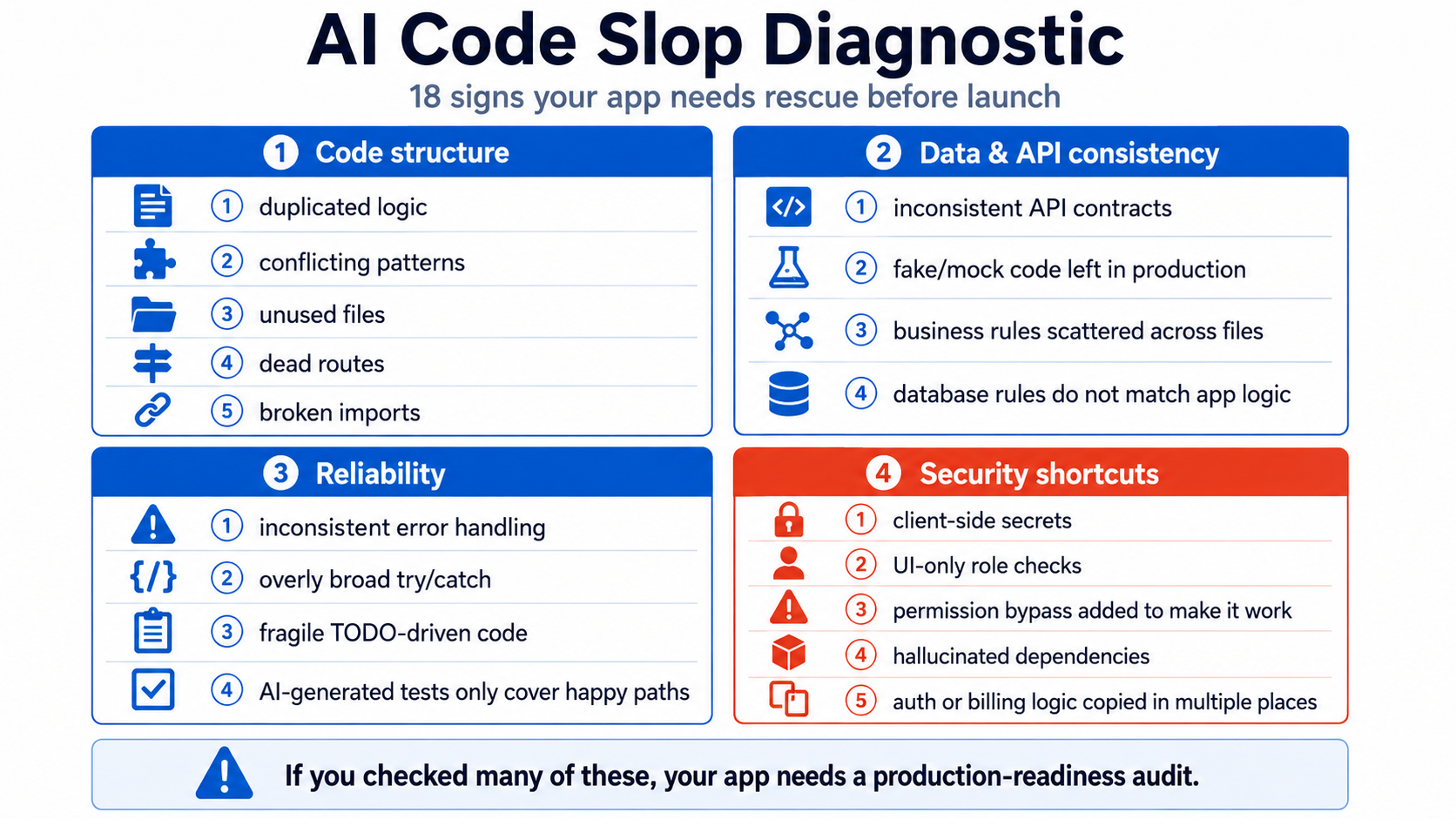
How AI code slop accumulates
AI coding tools usually work from a limited slice of the repository and the instructions provided in the current conversation. Even when an agent can search the full project, it may optimize for “make this task pass now” rather than “preserve one system-wide design.”
A typical sequence looks like this:
- The first prompt creates a sensible pattern.
- A later prompt cannot find or understand it, so it creates a second pattern.
- A bug appears between the two patterns.
- Another prompt adds a compatibility layer or broad exception.
- The original code remains because removing it feels risky.
- Tests are generated around the current behavior rather than the intended behavior.
Repeat that cycle across authentication, forms, database access, and billing, and the prototype becomes expensive to verify.
Research gives us reasons to inspect generated code carefully without pretending every generated line is insecure. An empirical study of 733 AI-attributed snippets found security weaknesses across dozens of CWE categories, while a separate package-hallucination study found that code models sometimes recommend dependencies that do not exist. Both studies have scope and methodology limits, but they support one practical rule: generated output is a proposal, not evidence that the implementation is correct. See the Copilot security study and the package hallucination study.
Repository and architecture signals
1. The same business rule appears in several places
Search for plan names, role names, limits, status values, and pricing identifiers. If “Pro users may create 20 projects” is independently encoded in a component, API route, database function, and webhook, those copies will eventually disagree.
How to verify: Pick one rule and trace every way it can be enforced or bypassed. Identify one source of truth. Other layers may repeat the check for defense in depth, but they should derive from the same model and have tests proving agreement.
2. Similar helpers do almost the same thing
Common examples include formatDate, formatUserDate, displayDate, and formatDateTime, each handling time zones or null values differently.
Duplicated helpers are not always harmful. The red flag is duplication around security, money, ownership, validation, or state transitions.
How to verify: Search function names and key phrases. Compare inputs, outputs, error behavior, and callers. Consolidate only after tests capture the intended behavior.
3. Different features follow conflicting architectural patterns
One feature fetches through an API route. Another imports the database client directly into a component. A third uses a server action. A fourth writes to local storage and “syncs later.”
Each pattern can be valid in isolation. The risk is that no one can explain why a feature uses one rather than another.
How to verify: Create a one-page route and data-flow map. For each feature, record where input is validated, where authorization runs, where data is written, and how errors reach the user.
4. Files, components, routes, and feature flags have no known caller
AI tools often create replacement files rather than safely editing the original. The old file remains, and nobody knows whether production still imports it.
Dead code makes searches misleading and increases the chance that a future agent edits the wrong implementation.
How to verify: Use your framework’s build output, TypeScript checks, dependency graph tools, route listing, and repository search. Remove dead code in small batches and run behavior-focused tests after each batch.
5. The repository contains “temporary” compatibility layers with no removal condition
Look for adapters named legacy, temp, fallback, old, v2, new, or compat. Also inspect comments such as “keep both for now” and “remove after migration.”
How to verify: For each layer, document which callers still need it, what data shape it translates, and the event that allows removal. A TODO without an owner or condition is not a plan.
Dependency and API signals
6. A dependency cannot be found in the official registry or documentation
Code-generating models can produce plausible package names. A large study generated 576,000 samples and reported package hallucinations across commercial and open models. The exact rates depend on the model and experimental setup, but the failure mode is real. Read the paper.
How to verify: Confirm every newly introduced package in the official npm, PyPI, or relevant registry. Check the publisher, repository, release history, license, maintenance status, and whether the package name is a typo-squatting risk.
7. Imports refer to APIs from the wrong library version
The package exists, but the generated method belongs to an older tutorial, a beta release, a different SDK, or another language.
How to verify: Install from a lockfile in a clean directory. Run the production build, type checker, and tests with no global packages. Compare the used API against the documentation for the exact installed version.
8. The lockfile, manifest, and deployed runtime disagree
A local machine may use Node 24 while the host uses another version. A Python app may have an unpinned transitive dependency. The repository may contain both npm and pnpm lockfiles after an AI tool changed package managers.
How to verify: Choose one package manager, commit one authoritative lockfile, declare the runtime version, and reproduce installation in CI. Treat an unexplained lockfile rewrite as a review event, not harmless noise.
Behavior and error-handling signals
9. Mock or fake behavior can still execute in production
Search for mock, fake, demo, sample, seed, placeholder, and hard-coded successful responses. Check whether a missing API key silently switches to fake data.
This is especially dangerous in billing, email, AI calls, and identity checks because the interface can show a success state that never occurred.
How to verify: In a production-like environment, deliberately remove each external dependency and confirm the app fails visibly and safely. A production system should not fabricate success to keep the demo moving.
10. Broad try/catch blocks convert failures into normal responses
A generated handler may catch every exception and return an empty array, null, or { success: true } so the interface stops crashing.
That erases the evidence needed to diagnose a real failure.
How to verify: Inspect catches around data writes, payments, authentication, and background jobs. Confirm they log structured context, return an honest error, preserve retry semantics, and do not expose sensitive internals to the user.
11. API endpoints return inconsistent shapes for the same concept
One endpoint returns { data, error }, another throws, another returns a bare array, and another uses HTTP 200 with an error string.
The frontend then grows defensive conditionals until every failure looks like an empty state.
How to verify: Document a small API contract for success, validation failure, unauthenticated, unauthorized, not found, conflict, and server error. Test status codes and response bodies, not only component rendering.
12. Comments and prompts describe behavior that the code does not implement
AI-generated comments can sound authoritative even after the implementation changes. A comment may claim a route is “admin only” while the handler checks only whether a session exists.
How to verify: Treat security-relevant comments as claims to test. Delete comments that merely restate imagined intent. Keep comments for non-obvious constraints and link them to tests or decisions where possible.
13. Nobody owns the state machine
Orders, subscriptions, invitations, approval requests, jobs, and onboarding flows all have states and allowed transitions. In slop-heavy apps, any route can write any status string.
How to verify: List valid states and transitions. Put transition rules in one service or domain layer. Add database constraints where practical. Test illegal transitions, retries, and concurrent requests.
Security and permission signals
14. A secret or privileged key appears in client-side code
Search both source files and the built JavaScript. A variable name that begins with NEXT_PUBLIC_, VITE_, or another framework-specific public prefix is intended for browser exposure.
Not every browser-visible key is a secret. Supabase publishable keys and some analytics identifiers are designed for the client. The question is what authority the key grants. A service-role key, payment secret, private API token, or unrestricted backend credential must not be shipped to the browser.
How to verify: Build the app, search the output for key prefixes and known values, and inspect network requests. Rotate any real secret that was committed or exposed; deleting it from the latest commit is not enough.
15. Role checks exist only in the interface
A button disappears for ordinary users, but the endpoint performs no equivalent authorization.
OWASP recommends validating authorization on every request. Next.js also distinguishes optimistic interface checks from secure checks near the data source.
How to verify: Call privileged endpoints directly as an ordinary user and as an unauthenticated client. Test read, create, update, delete, bulk actions, exports, and file URLs.
16. A “make it work” bypass disables a real protection
Examples include turning off Row Level Security, accepting every CORS origin, skipping webhook signatures, disabling certificate checks, trusting a user-supplied role, or using an administrator client for ordinary requests.
These changes often enter the code after an AI assistant encounters a permission error and is asked to fix it quickly.
How to verify: Search configuration for wildcards, disabled verification, service-role clients, permissive policies, and comments mentioning temporary bypasses. For every bypass, identify the original error and repair the authorization model instead.
17. Database policy and application logic disagree
The UI may believe a team owner can delete a record while RLS blocks it. Worse, the UI may hide another user’s record while RLS allows it.
Supabase explains that RLS policies act like additional query conditions. Firebase has a different trap: Firestore Security Rules are not filters; a query must be compatible with the rules for its potential result set.
How to verify: Build a permission matrix using anonymous, User A, User B, manager, and administrator contexts. Test the database or emulator directly, not only through the normal interface.
Test-quality signals
18. The tests cover happy paths and mocks but not real boundaries
A test suite can be green while authentication, RLS, webhooks, migrations, and production builds are untested.
Playwright recommends testing user-visible behavior and keeping tests isolated. For Firebase, the Rules Unit Testing Library lets you test authenticated and unauthenticated access against the emulator rather than production.
How to verify: Temporarily remove or break the behavior under test. A meaningful test should fail. Add tests for another user’s data, expired sessions, duplicate requests, dependency failures, invalid state transitions, and interrupted workflows.
A practical diagnostic workflow
Do not begin by rewriting the app. First establish what the system actually does.
Step 1: Make the build reproducible
From a clean clone:
- install using the committed lockfile;
- run linting, type checks, tests, and the production build;
- document every required environment variable;
- confirm no manual local file or global tool is required.
Step 2: Map critical journeys
Choose five to eight journeys that define the product:
- sign up and verify identity;
- create the first useful record;
- view and modify owned data;
- invite or collaborate with another user;
- upgrade, cancel, or renew;
- recover account access;
- export or delete data;
- receive support after a failure.
Trace each journey through the interface, server, database, external services, logs, and alerts.
Step 3: Map trust boundaries
Mark every point where untrusted input enters the system: browser forms, URL parameters, webhooks, uploaded files, OAuth callbacks, AI prompts, support tools, and administrator actions.
For each boundary, record validation, authentication, authorization, rate limits, logging, and failure behavior.
Step 4: Reduce contradiction before reducing code
The target is not the fewest lines. The target is one understandable model for:
- identity and roles;
- data ownership;
- business rules;
- error handling;
- configuration;
- billing state;
- deployment and rollback.
Consolidate one high-risk area at a time and protect it with behavior-focused tests.
When does an app need rescue rather than cleanup?
A focused cleanup is usually enough when the app builds reliably, permissions are sound, data migrations are reproducible, and the main problem is duplication or naming.
A deeper rescue is justified when several of these are true:
- production access cannot be explained;
- user data is not reliably isolated;
- privileged keys have been exposed;
- schema history is incomplete;
- billing access is controlled by the browser;
- no backup has been restored successfully;
- critical flows cannot be tested without mocks;
- the builder is afraid to change the code because nobody knows which implementation is active.
The answer is still not automatically “rewrite everything.” A production-readiness audit should identify the smallest safe repair plan, preserve working product behavior, and sequence changes so the app remains recoverable.
Your app does not need to be elegant before launch. It does need to be explainable. My AI App Rescue / Production Readiness service maps the real code paths, permissions, data rules, deployments, billing, and failure recovery before recommending repairs.
Sources and further reading
- Security Weaknesses of Copilot-Generated Code in GitHub Projects
- We Have a Package for You! Package Hallucinations by Code-Generating LLMs
- OWASP Authorization Cheat Sheet
- Next.js Authentication Guide
- Supabase Row Level Security
- Firebase: Securely Query Data
- Firebase Security Rules Unit Testing
- Playwright Best Practices