AI app builders make database work feel deceptively simple.
Describe a table. Generate a form. Connect the client. A few prompts later, users can create and edit records. For a prototype, that speed is valuable.
For production, CRUD is the easy part.
The hard questions are:
- Which user owns each record?
- Which rows may a teammate read or change?
- Can a user change the ownership field?
- Do browser queries and database rules agree?
- Can the schema be recreated from the repository?
- What happens if a migration fails halfway?
- Is there a backup, and has anyone restored it?
This guide focuses on Supabase and Firebase because they are common in AI-built apps, but the underlying review applies to any database-backed product.
Start with the ownership model, not the tables
Before reading policies or rules, write down the product’s data relationships in plain language.
For example:
- A user may belong to multiple workspaces.
- A project belongs to exactly one workspace.
- Workspace members can read projects.
- Editors can update ordinary fields.
- Only owners can delete a project or change membership.
- Removing a member must immediately block access.
- Support staff cannot read customer content unless an audited support-access process is used.
This becomes the expected policy. The existing schema and code do not get to define the policy simply because they already exist.
For every table or collection, identify:
- owner or tenant key;
- creator and last editor;
- required relationships;
- allowed readers and writers;
- lifecycle and deletion behavior;
- whether records contain personal, financial, authentication, or other sensitive data.
If a resource has no clear owner or tenant key, fixing access control later becomes difficult.
Supabase: the publishable key is not the authorization system
Supabase is designed to support browser access through a publishable key. That key is expected to appear in client code. Security comes from PostgreSQL permissions and Row Level Security policies behind it.
Supabase’s RLS documentation says browser access can be secure when RLS is enabled. It also says RLS must be enabled on tables in exposed schemas. Tables created through the dashboard’s Table Editor have RLS enabled by default, while tables created with raw SQL may require you to enable it explicitly.
This means a secret scan alone is not enough. You must test what an anonymous or ordinary user can do with the normal client configuration.
Check every exposed table
For each table in the exposed schema, record:
- Is RLS enabled?
- Which roles have table privileges?
- Which policies apply to
SELECT,INSERT,UPDATE, andDELETE? - Do policies specify the intended roles?
- Are ownership columns protected against reassignment?
- Are there functions or views that bypass the intended policy?
After RLS is enabled, Supabase notes that API access through a publishable key returns no data until appropriate policies exist. That fail-closed behavior is safer than a broad temporary policy such as using (true) that remains after debugging.
USING and WITH CHECK protect different moments
A simplified ownership policy might look like this:
alter table projects enable row level security;

create policy "members can read workspace projects"
on projects
for select
to authenticated
using (
  exists (
    select 1
    from workspace_members wm
    where wm.workspace_id = projects.workspace_id
      and wm.user_id = (select auth.uid())
  )
);
For inserts and updates, you also need to decide what new row values are allowed. WITH CHECK validates the row being inserted or the resulting row after an update.
create policy "members can create projects in their workspace"
on projects
for insert
to authenticated
with check (
  exists (
    select 1
    from workspace_members wm
    where wm.workspace_id = projects.workspace_id
      and wm.user_id = (select auth.uid())
      and wm.role in ('owner', 'editor')
  )
);
These examples are illustrations, not copy-paste policies for every schema. Test them against your real role and membership rules.
A common mistake is to protect which existing rows can be updated while allowing the update to change workspace_id or owner_id to a value the user should not control. Use both the existing-row and resulting-row checks where needed.
Do not store trusted roles in user-editable metadata
Supabase warns that raw_user_meta_data can be changed by the authenticated user and should not be used as trusted authorization data. raw_app_meta_data is controlled by the server and is more suitable for claims such as roles. Even then, remember that JWT claims can be stale until the token refreshes.
For high-impact operations, current membership or role data may need to be loaded from the database instead of trusting a long-lived claim.
Views and functions need separate review
Supabase documents an easy-to-miss PostgreSQL behavior: views commonly bypass underlying RLS by default because they are created with security-definer behavior. On PostgreSQL 15 and later, a view can be configured with security_invoker = true so the caller’s policies apply. Otherwise, restrict access or place sensitive views in an unexposed schema.
Also inspect database functions marked SECURITY DEFINER. They run with the function owner’s privileges and can accidentally become a bypass if inputs, search paths, and permissions are not tightly controlled.
Service-role keys belong only in trusted server code
Supabase service keys can bypass RLS. They are appropriate for controlled administrative jobs, trusted backend operations, or migrations—not ordinary browser requests.
Search the source, compiled bundle, logs, screenshots, support tickets, and repository history for service-role keys. If one has been exposed, rotate it and investigate what it could access. Merely moving the variable to a server file after exposure is not enough.
Firebase: rules are part of the query design
Firestore Security Rules do not work like a database filter that removes unauthorized documents after the query runs.
Firebase’s documentation says rules are not filters. Firestore evaluates a query against its potential result set. If the query could return forbidden documents, the entire request is rejected.
That has two practical consequences:
- A query that works with permissive development rules can fail after proper rules are added.
- The query and the rule must be designed together.
For example, if users may read only documents whose ownerUid matches their authenticated UID, the client query generally needs a matching constraint rather than requesting the whole collection and filtering in JavaScript.
Server libraries can bypass client security rules
Firestore server client libraries use server credentials and IAM rather than ordinary mobile/web Security Rules. That is useful for trusted backend work, but it means moving a vulnerable endpoint to the server does not automatically make it safe.
The server endpoint must perform its own authorization before using privileged credentials.
Test rules in the emulator
Firebase provides a Security Rules Unit Testing Library for authenticated and unauthenticated contexts against the emulator. Use it to test allowed and denied operations without touching production.
Build tests for:
- anonymous reads and writes;
- owner versus non-owner access;
- role changes;
- prohibited ownership changes;
- query constraints;
- deleted or disabled accounts;
- malformed documents;
- maximum sizes and counts;
- storage paths tied to another user.
The Firestore emulator request monitor and rules coverage tools can also reveal which rules evaluated and which expressions remain untested.
A database policy is only as good as its tests
A useful test matrix should use at least these identities:
- anonymous;
- User A;
- User B;
- workspace member;
- workspace manager;
- workspace owner;
- removed member;
- privileged backend job.
For each resource, test:
- list and query;
- direct read by known ID;
- create with valid ownership;
- create while claiming another owner;
- update ordinary fields;
- update ownership or tenant fields;
- delete;
- access through a view, function, search index, export, file URL, or background job.
Do not stop after proving the allowed cases. Security rules are defined just as much by what they deny.
Migrations must be the history of the schema
AI-assisted projects often begin with direct dashboard editing because it is fast. That becomes risky when the team also starts adding migration files.
Then there are two histories:
- what the repository says happened;
- what actually happened in the hosted database.
Supabase’s database migration guide recommends managing schema changes through migration files and warns that remote dashboard changes can produce drift. Whatever migration tool you use, establish one authoritative workflow.
A migration-ready launch should pass these tests:
- Create an empty local or temporary database.
- Apply every migration in order.
- Load safe seed data.
- Start the current app.
- Run integration and permission tests.
- Apply any pending migration against a realistic copy of production data.
- Verify rollback or forward-repair procedures for the risky steps.
Avoid deployment races
A deployment can fail even when both the code and migration are correct if they arrive in the wrong order.
Suppose the new code expects a non-null column that the old schema does not have. If the application deploys first, requests fail. If the migration removes a column still used by old instances, the old version fails.
Use backward-compatible sequences for risky changes:
- Add the new nullable column or table.
- Deploy code that can use both old and new forms.
- Backfill data.
- Switch reads and writes.
- Add stricter constraints.
- Remove the old field in a later release.
This is slower than a one-step rewrite and much easier to recover.
Constraints are production safeguards, not inconveniences
AI-generated application validation can be bypassed by another endpoint, a background job, a stale client, or a future code change.
Use database constraints for facts that must always be true:
- foreign keys for real relationships;
- unique constraints for identifiers and one-per-user records;
- not-null constraints when absence is never valid;
- check constraints for valid ranges or state combinations;
- transactional updates for related writes;
- idempotency or unique event IDs for webhook processing.
Application validation produces friendly errors. Database constraints protect integrity when the application makes a mistake.
Index the fields used by real queries and policies
A prototype with ten rows can hide a full-table scan.
Review slow or frequent queries using actual query plans where possible. Index:
- foreign keys used for joins;
- tenant and ownership columns used in filters;
- columns used in RLS policies;
- webhook event IDs used for deduplication;
- status and timestamp combinations used by job queues;
- frequently searched fields, using an index appropriate to the query.
Supabase specifically recommends indexing columns used in RLS policies. Security rules that require scanning large amounts of data can become a performance problem as the table grows.
Do not add indexes blindly. Every index has write and storage costs. Add them for observed query shapes and expected launch traffic.
Seed data must never create a production backdoor
Seed scripts often contain convenient accounts such as:
ad***@*****le.comwith a known password;- a fixed verification code;
- an “always paid” subscription;
- a role assignment that runs on every startup;
- sample records containing real-looking personal data.
Separate development fixtures from production initialization. A production seed should be safe to run repeatedly, create only necessary reference data, and never downgrade permissions or overwrite customer records.
Search deployment scripts for seed commands that might execute automatically.
A backup is not proven until it is restored
A dashboard that says “daily backups enabled” is useful. It is not a recovery test.
Before launch, document:
- what is backed up: database, file storage, authentication data, configuration, encryption keys, and external-provider state;
- how often backups run;
- retention period;
- where backups are stored;
- who can access them;
- whether backups are encrypted;
- how long a restore is expected to take;
- how much data could be lost between backups;
- how the application reconnects after restore.
Supabase documents CLI-based logical backups and explicitly warns against storing backups in a public repository. Firebase provides product-specific backup and export mechanisms; choose the one appropriate to your database and plan.
Perform a restore into a separate environment. Then run application reads, ownership tests, and a critical user journey. Recovery is a behavior, not a file-download checkbox.
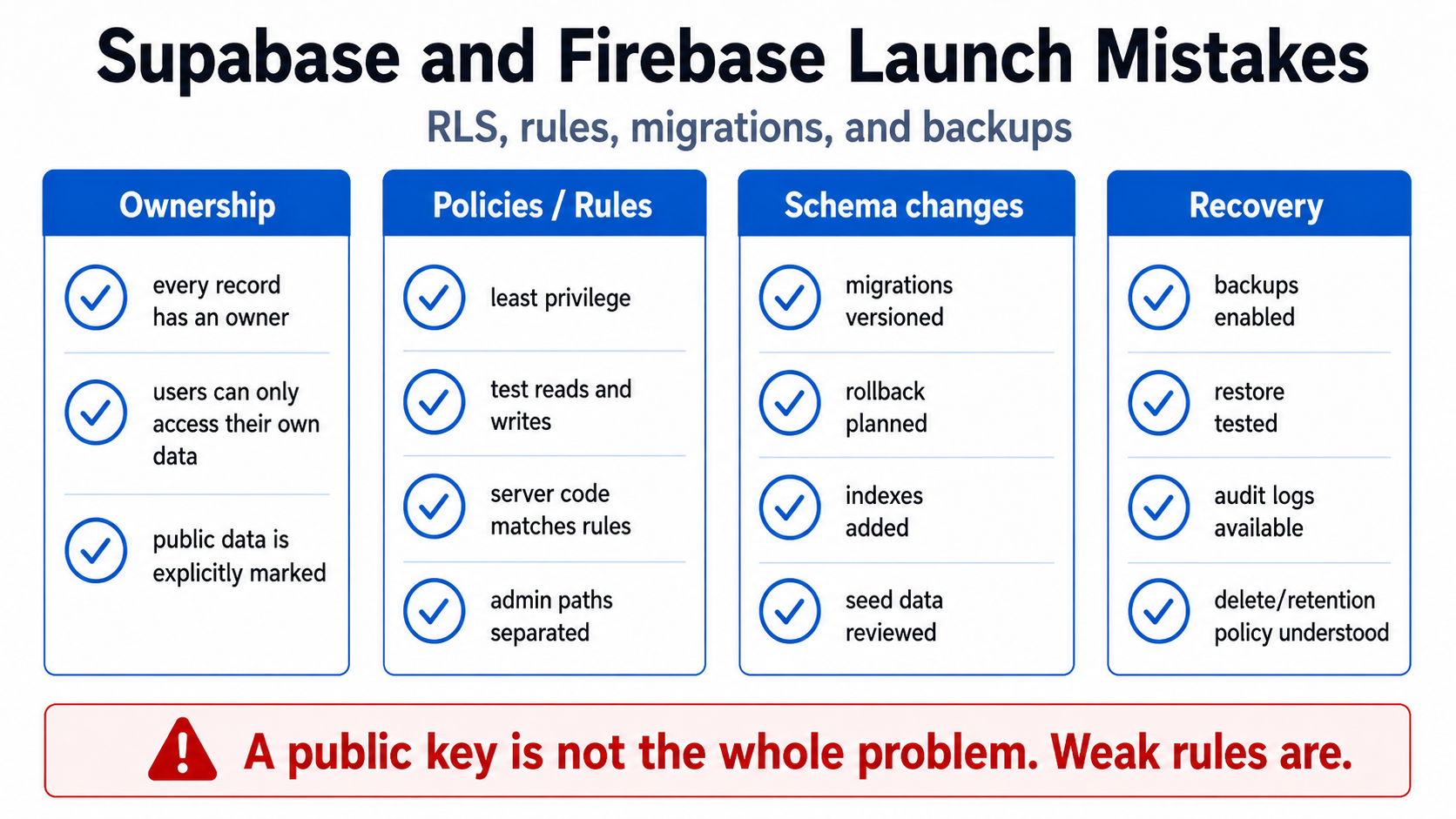
Database launch review
Before real users arrive, confirm:
- every sensitive table or collection has a written owner and tenant model;
- anonymous and cross-user access have explicit denied tests;
- browser-visible keys grant only intended authority;
- service credentials are server-only and least-privileged;
- RLS, Firestore rules, storage rules, views, and server endpoints agree;
- migrations can recreate the schema from nothing;
- production drift has been reconciled;
- destructive migrations have a staged rollout and recovery plan;
- constraints protect critical invariants;
- important policy and query columns are indexed;
- production does not contain demo credentials or unsafe seed behavior;
- backups have been restored successfully.
The database should not merely contain the right data today. It should preserve ownership, integrity, and recoverability when the app, user, or deployment behaves incorrectly.
Related reading: Authentication Is Not Authorization and the deployment reality check.
Need a database and permissions review before launch? The AI App Rescue / Production Readiness service tests real account boundaries, schema history, privileged keys, migrations, and recovery—not only whether CRUD works.
Sources and further reading
- Supabase Row Level Security
- Supabase Database Migrations
- Supabase Automated Backups with the CLI
- Firebase: Securely Query Data
- Firebase Security Rules Unit Testing
- Firebase Emulator: Connect Firestore and Inspect Rules
- OWASP Authorization Cheat Sheet
About the author: Mamerto Fabian Jr. is the founder of Codefrost and a full-stack software architect with more than 20 years of software-development experience.