Deployment is where hidden assumptions become visible.
An AI-built app may run perfectly inside the tool that created it, on the original developer machine, or on a preview URL connected to a forgiving test database. Then the production build fails—or worse, it deploys successfully while using the wrong credentials, callback URLs, or data.
A production deployment is not “the host says Ready.” It is a repeatable process that produces the intended application, configuration, schema, domain behavior, and recovery path.
This review focuses on common stacks such as Next.js on Vercel and React/Vite on Netlify, with notes for Django and FastAPI backends.
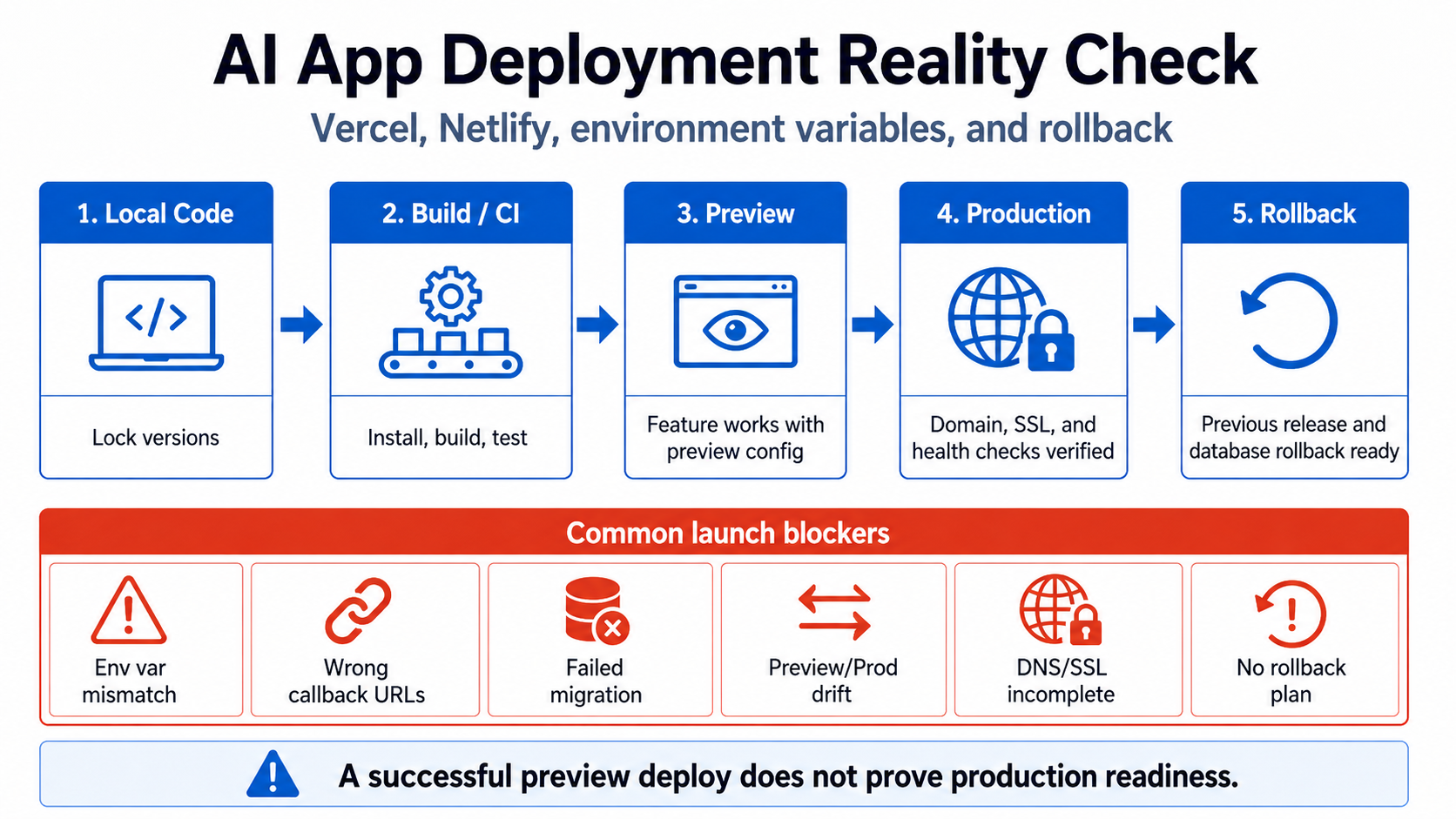
First test: can a clean machine build the app?
The original development environment may contain:
- uncommitted files;
- globally installed tools;
- cached generated code;
- an old dependency version;
- a local
.envfile nobody documented; - a database schema edited manually;
- a package manager different from the one used by the host.
Before launch, reproduce the build from a clean clone:
git clone <repository>
cd <repository>
# Install with the repository's chosen package manager and lockfile
# Run lint, type checks, tests, and the production build
The exact commands vary. The required outcome does not: the repository plus documented configuration should be enough.
Check these basics:
- one authoritative lockfile;
- declared Node, Python, or other runtime version;
- no required global package;
- generated clients and assets created by documented commands;
- case-sensitive import paths, because Linux hosts can reject paths that worked on a case-insensitive machine;
- no build-time request to a service that is unavailable or private;
- no test or mock dependency imported into the production bundle.
If the build works only after “a few manual fixes,” those fixes are part of the deployment and must be automated or documented.
Environment variables have scope, timing, and exposure
Treat environment variables as a typed configuration system, not a bag of strings.
For each variable, document:
- purpose;
- required or optional;
- secret or public;
- Development, Preview, Production, or all environments;
- build-time or runtime;
- expected format;
- owner and rotation method;
- safe failure behavior when missing.
A name such as API_KEY tells you almost nothing. A better inventory distinguishes a browser-visible analytics key from a server-only payment secret or database administrator credential.
Next.js: public variables are copied into browser code
Next.js documents that variables prefixed with NEXT_PUBLIC_ are inlined into the browser bundle during the build. Once built, that public value is effectively frozen into that deployment.
This creates two common failures:
- A secret is given the public prefix to make client code compile.
- A public environment value is expected to change at runtime when it was embedded at build time.
Search both the source and the built JavaScript for real secret values. Moving a secret into an unprefixed variable does not help if client-side code still imports and exposes it.
Vercel: environment changes need a new deployment
Vercel separates Development, Preview, and Production environment variables. It also supports branch-specific Preview values.
Review each environment separately. Do not assume that adding a variable to the dashboard repairs deployments that already exist. Redeploy and verify the new deployment.
Useful checks:
- Production points to production services.
- Preview does not write to production unless that is deliberate and controlled.
- Branch previews do not share a single mutable test tenant that causes test collisions.
- OAuth, email, payment, and webhook providers contain the correct production URLs.
- Team members who can view or change environment variables have appropriate access.
- old variables and rotated credentials are removed, not merely superseded.
Netlify: client builds cannot keep runtime secrets
In a React/Vite static build, anything needed by browser code is ultimately delivered to the user. A build system can substitute environment values, but substitution does not make them secret.
Netlify’s environment-variable guidance distinguishes values used during a build from sensitive values that should stay in serverless or edge functions. Put privileged API calls behind trusted server code rather than hiding a secret in an obfuscated frontend bundle.
With Vite, variables using the public client prefix are designed to be exposed. Confirm the exact prefix and behavior for your installed version.
Preview and production must not share accidental state
A preview deployment is public enough to be discovered or shared. It may also run unreviewed code from a branch.
Do not give every preview unrestricted production credentials.
For each preview environment, decide:
- Which database does it use?
- Can it send real email or SMS?
- Can it create live charges?
- Can it call production webhooks?
- Can it access customer files?
- Does it require authentication?
- When is it deleted?
- Is it indexed by search engines?
A safe default is isolated or sandboxed services with synthetic data. If a preview must inspect production, prefer read-only, audited, least-privileged access and never expose the credential to the browser.
Domain, DNS, and SSL are part of the launch
A custom domain can fail in several ways even when the host’s default URL works:
- DNS records point to an old provider;
- both root and
wwwversions resolve but neither has a canonical redirect; - the SSL certificate covers one hostname but not another;
- HTTP does not redirect to HTTPS;
- an OAuth provider allows only the preview callback;
- cookies are scoped to the wrong domain;
- CORS permits the host’s temporary domain but blocks the custom domain;
- a webhook points to a URL that redirects, which some providers treat as failure;
- email links use an old base URL.
Build a URL inventory:
https://example.comhttps://www.example.comhttps://app.example.com- host-provided production URL;
- preview URLs;
- API origin;
- OAuth callbacks;
- password-reset and email-verification callbacks;
- webhook endpoints;
- asset and file-storage domains.
For each one, define the intended response, redirect, authentication requirement, and indexing policy.
Test with a clean browser, mobile connection, and command-line request. Confirm certificates, redirect chains, cookie flags, and response headers.
Serverless functions have operational limits
A function that works during a manual test may fail under production conditions because of:
- execution timeout;
- cold-start latency;
- memory limits;
- request-body limits;
- connection exhaustion;
- ephemeral local storage;
- concurrent invocations processing the same job;
- background work being terminated after the response;
- region distance from the database.
Review every long or stateful operation: file processing, AI generation, bulk email, report creation, imports, exports, and webhook handling.
Use a durable queue or job system for work that must survive a function restart. Give jobs idempotency keys. Store progress in persistent data rather than process memory. Set explicit timeouts for external calls.
Do not rely on “return 200 and continue working in the background” unless the platform explicitly supports the mechanism you are using.
Health checks must verify useful behavior
A route returning HTTP 200 proves that a process answered. It does not prove that login, the database, storage, or billing works.
Use layers:
- Liveness: the application process can answer.
- Readiness: required dependencies are reachable enough to serve traffic.
- Synthetic journey: a safe test account can complete one critical flow.
- Business signal: expected real actions such as completed sign-ups or processed webhooks are occurring.
Google’s SRE guidance recommends monitoring latency, traffic, errors, and saturation. For a small app, this can begin with uptime checks, error tracking, host metrics, and alerts on repeated integration failures.
Avoid a health endpoint that exposes internal versions, credentials, stack traces, or detailed network topology.
Database migrations and deployments need an order
The code deployment and the database migration are one release, even when separate tools run them.
Dangerous patterns include:
- new code reads a column before it exists;
- a migration drops a column while old instances still use it;
- two deployments run the same destructive migration;
- a build process runs migrations from every preview;
- migration failure leaves half the schema changed;
- the app starts accepting writes before a required backfill completes.
Prefer backward-compatible releases:
- Add the new schema without breaking old code.
- Deploy code that understands both versions.
- Backfill and verify data.
- switch the authoritative read/write path;
- tighten constraints;
- remove old schema later.
For Supabase projects, the migration documentation recommends keeping schema changes in migration files and testing them locally. For other stacks, use the equivalent migration system and make one pipeline responsible for applying changes.
CI/CD needs least privilege too
A generated GitHub Actions workflow can deploy the app quickly while granting broad permissions to every job.
GitHub’s secure-use guidance recommends:
- giving
GITHUB_TOKENonly the permissions a job needs; - keeping sensitive values in secrets rather than workflow text;
- handling untrusted values safely to avoid script injection;
- reviewing third-party actions;
- pinning actions to a full-length commit SHA when immutability matters;
- avoiding privileged workflows that check out untrusted pull-request code.
Review .github/workflows as production code. A compromised action can access repository secrets and deployment credentials available to its job.
Use deployment environments with approvals for production where appropriate. Prefer short-lived cloud authentication such as OIDC over long-lived administrator keys when the provider supports it.
A rollback is not “deploy the previous commit”
The previous application version may not understand the new database schema. A bad release may have already sent emails, created charges, changed data, or queued jobs. Rolling back code cannot undo those side effects.
For each release, ask:
- Can the previous code run against the new schema?
- Which data changes are reversible?
- Which side effects are irreversible?
- Can a feature flag disable the risky path?
- Is there a known-good deployment to promote?
- Can credentials be rotated quickly?
- Can writes be paused while reads remain available?
- Who decides to roll back?
A practical release note should include the migration, configuration changes, verification steps, and rollback or forward-repair plan.
Stack-specific launch notes
Next.js + Vercel
- Verify which routes are static, dynamic, edge, or serverless.
- Keep privileged code in server-only modules.
- Confirm
NEXT_PUBLIC_variables are intentionally public. - Test Preview and Production environment scopes separately.
- Re-deploy after changing environment variables.
- Do not rely on middleware alone for authorization; re-check near the data source.
- Verify cache behavior after authentication and data changes.
React/Vite + Netlify
- Treat the browser bundle as public.
- Put privileged calls in Netlify Functions, Edge Functions, or another backend.
- Verify SPA rewrite rules do not intercept API or webhook routes.
- Check the public variable prefix and inspect the built assets.
- Test form, function, and redirect behavior on the custom domain.
- Confirm deploy previews use sandbox services.
Django backend
Django’s deployment checklist recommends running manage.py check --deploy, disabling DEBUG, protecting SECRET_KEY, setting ALLOWED_HOSTS, using a production WSGI or ASGI server, enforcing HTTPS, configuring static and media files, backups, logging, and error reporting.
Do not use manage.py runserver in production. Confirm user-uploaded media cannot be executed by the web server.
FastAPI backend
FastAPI’s deployment concepts cover HTTPS termination, startup, automatic restarts, worker processes, memory, and steps that must occur before serving traffic.
Confirm:
- a process manager or platform restarts crashed workers;
- the chosen worker count fits available memory and database connections;
- migrations run once, not from every worker;
- proxy headers and the public base URL are configured correctly;
- CORS allows only intended origins;
- OpenAPI documentation exposure matches your security decision.
Production deployment verification
Before announcing the launch:
- Deploy from a clean, tagged commit.
- Verify the exact environment and database target.
- Run migrations through the controlled pipeline.
- Complete sign-up, login, password reset, core action, and logout on the custom domain.
- Test an unauthorized cross-user request.
- Trigger one sandbox or low-risk integration event and verify logs.
- Confirm HTTP-to-HTTPS and hostname redirects.
- Confirm the app does not expose server secrets in HTML or JavaScript.
- Check error tracking and alert delivery by producing a safe test error.
- Rehearse rollback or disablement of the riskiest new feature.
- Record the deployed commit, migration version, and configuration changes.
A deployment is ready when another competent person can reproduce it, verify it, and recover it without depending on the original builder’s memory.
Related: database migrations and backups and production tests, monitoring, and support.
A preview URL is not a production-readiness review. The AI App Rescue / Production Readiness service checks the deployment chain from repository and environment scopes through migrations, domains, observability, and rollback.